Insights / Articles
4 Integration Patterns for Firmographic Data That Scale Without Breaking Your Pipeline
Tired of your firmographic data pipeline breaking? Uncover 4 scalable integration patterns that keep your data flowing smoothly.

- 74% of sales professionals are doing manual data cleansing work.
- Batch syncs can keep a database current at a fraction of the effort.
- Using firmographic data helps ensure your product sells.
Every firmographic data workflow starts somewhere, and for most teams that somewhere is a spreadsheet.
The problem is when that integration pattern becomes the process nobody wants to replace.
This guide covers four integration patterns, from manual exports to firmographic data embedded inside your own product, and explains what each one costs and when to leave it.
Level 1: Manual Export/Import
Most teams start with this level, where enrichment happens by hand and on request.
Here we're talking about CSV exports pulled from a customer relationship management (CRM) system, opened in Excel or Google Sheets, and matched against a provider's records column by column.
This is a typically manual process.
Somebody exports a list of accounts, looks companies up or sends the file for enrichment, pastes the results back, and re-imports it.
Nobody schedules it, so it happens when a campaign needs a segment.
The volume of that work shows up in survey data on how sales teams spend their time.
Salesforce surveyed 4,050 sales professionals across 22 countries in late 2025 and found nearly three-quarters of them doing data cleansing work, meaning removing duplicates and correcting errors by hand.
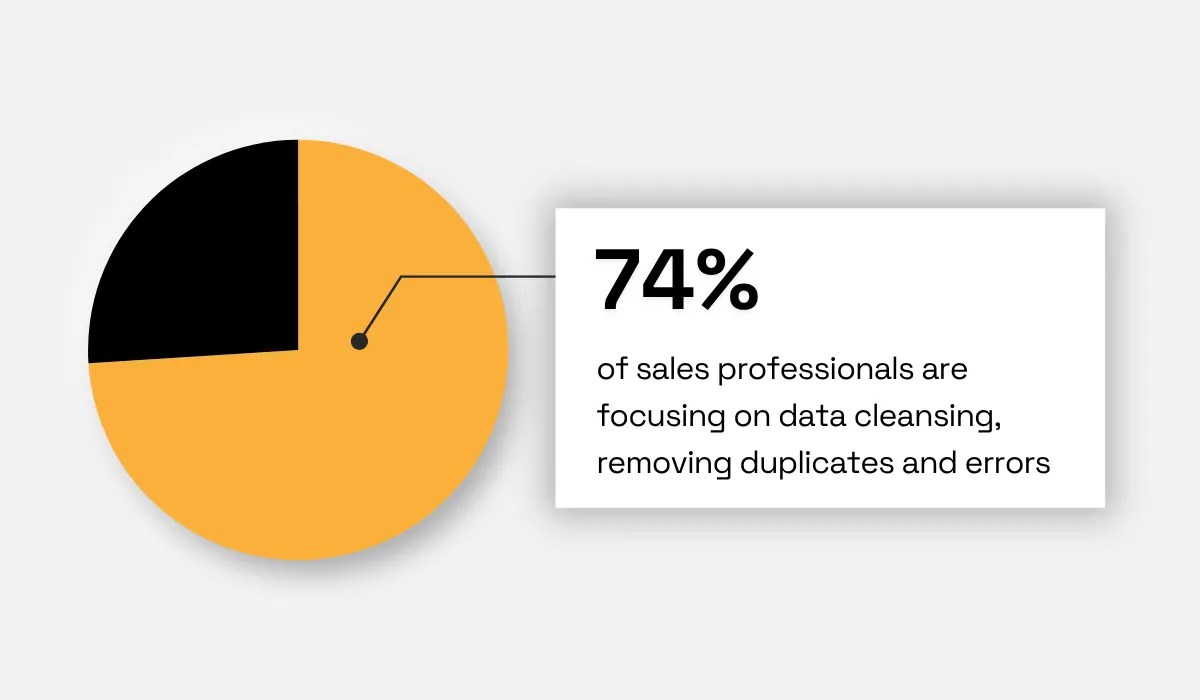
Illustration: Veridion / Data: Salesforce
This manual process can work for a while, especially for smaller teams where one person owns the sheet and a few hundred accounts are all that matter.
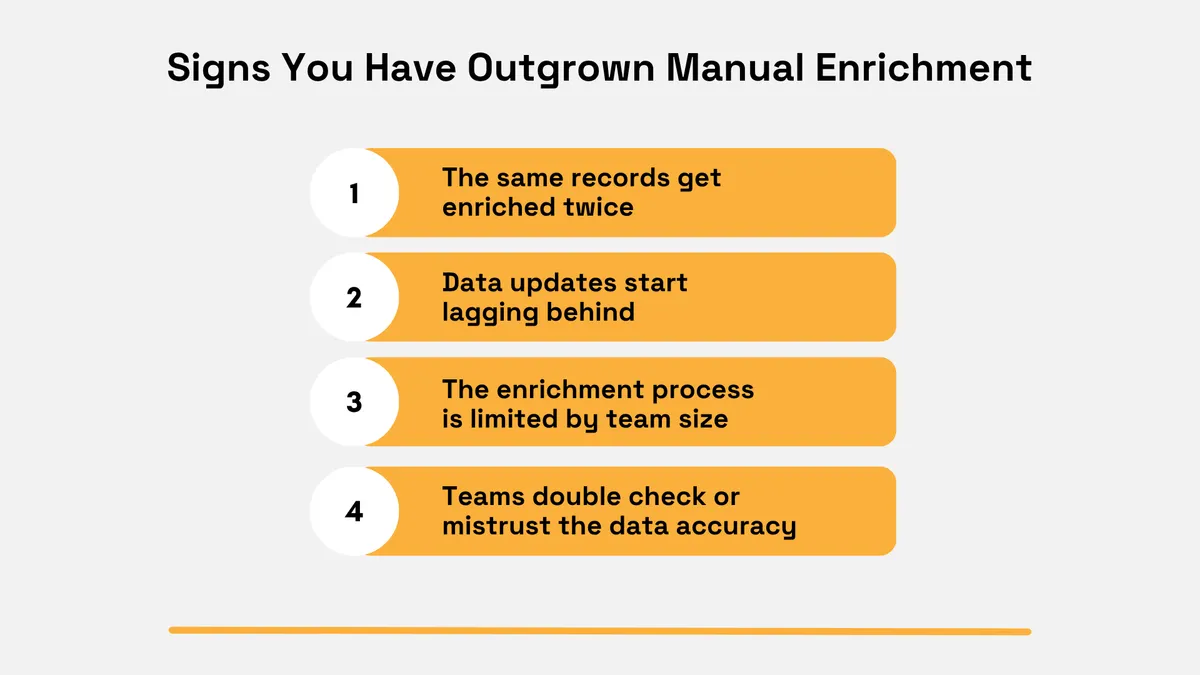
Over time, some signs can appear that it's time to move on.
Source: Veridion
For instance, important data updates can start lagging behind while other records get enriched twice by different team members, because no synced source exists to record what was already done.
These signs are an indication that a more automated process is needed, one where enrichment runs on a schedule rather than on request.
The benefits you get from that are often significant, as shown in this next case study.
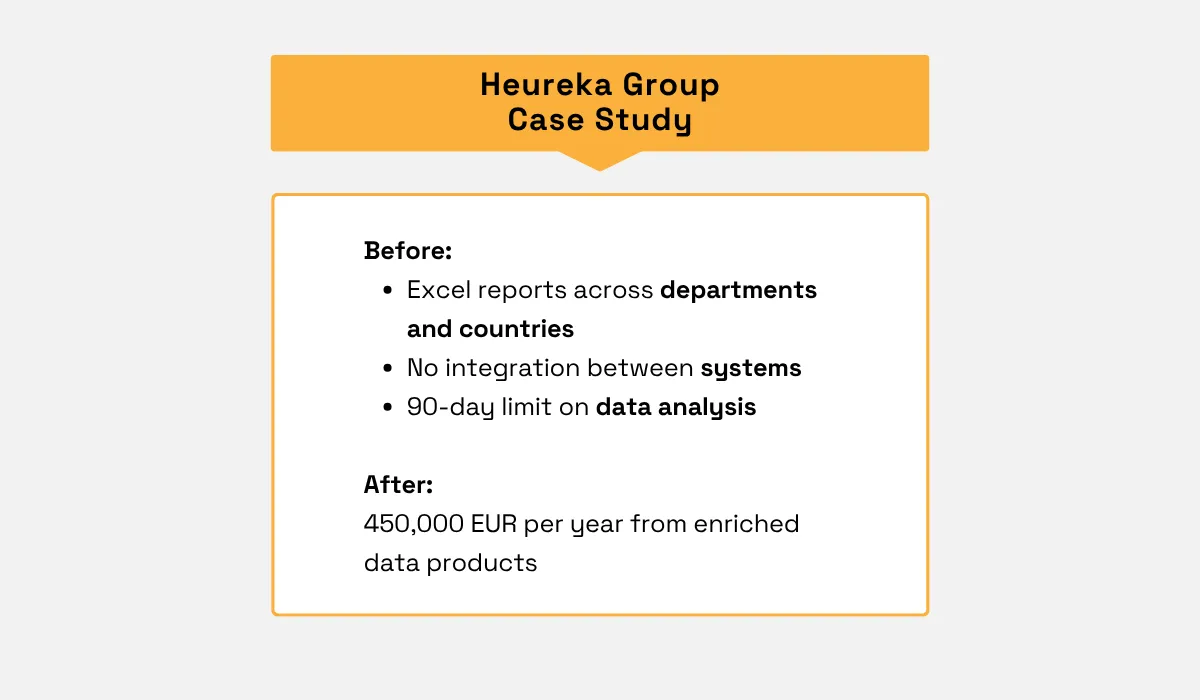
Heureka Group, which serves more than 5,000 e-commerce shops in central Europe, ran Excel reports across departments and countries with no integration between systems.
Not having centralized reports across departments is bad enough, but across countries it is harder again, since each market defines the same metric differently.
After centralizing and enriching that data, it generated 450,000 EUR a year from data products sold to brands and shops, according to Keboola.
Sometimes, however, even despite these inefficiencies, teams keep using this method.
One reason is that changing a working process feels riskier than tolerating a slow one, particularly when the person who owns the spreadsheet is also the person who would have to rebuild it.
However, staying too long makes the process more error-prone, because manual steps multiply as the account base grows and each one is another place a value can be mistyped.
Level 2: Scheduled Batch Sync
Moving to a scheduled batch sync makes that same enrichment a consistent process rather than a task somebody remembers to do.
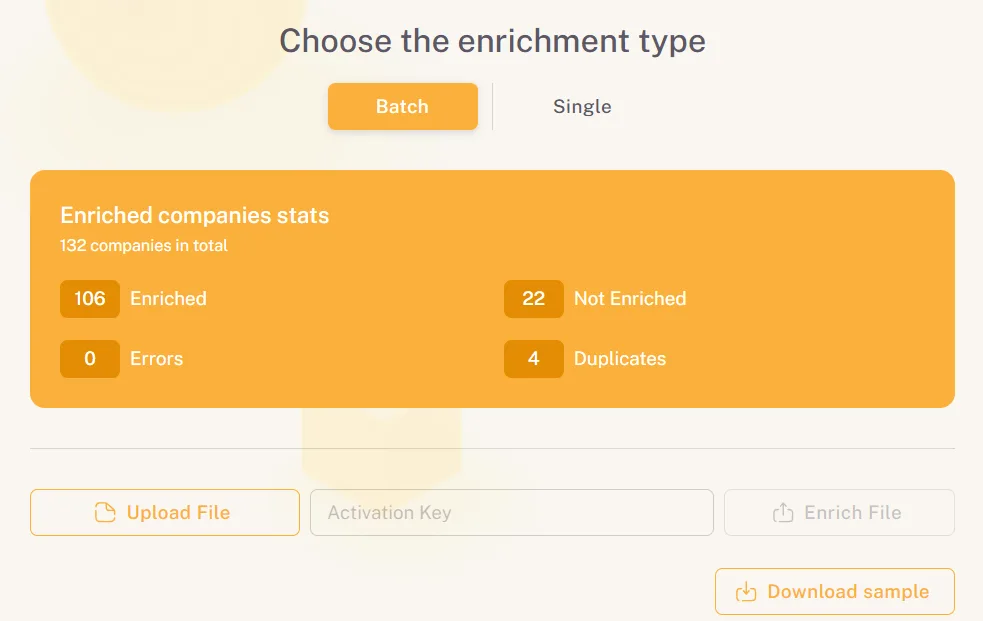
When using a capable enrichment service, deduplication, error detection, and match reporting come with the service rather than being work your team performs on the file afterwards.
Source: Veridion
A batch enrichment process reports what happened to every row before anything is written back.
You get a repeatable pass over the whole account base, with a visible match rate each time and no spreadsheet involved.
That said, one consideration is the cadence, meaning how often the sync actually runs.
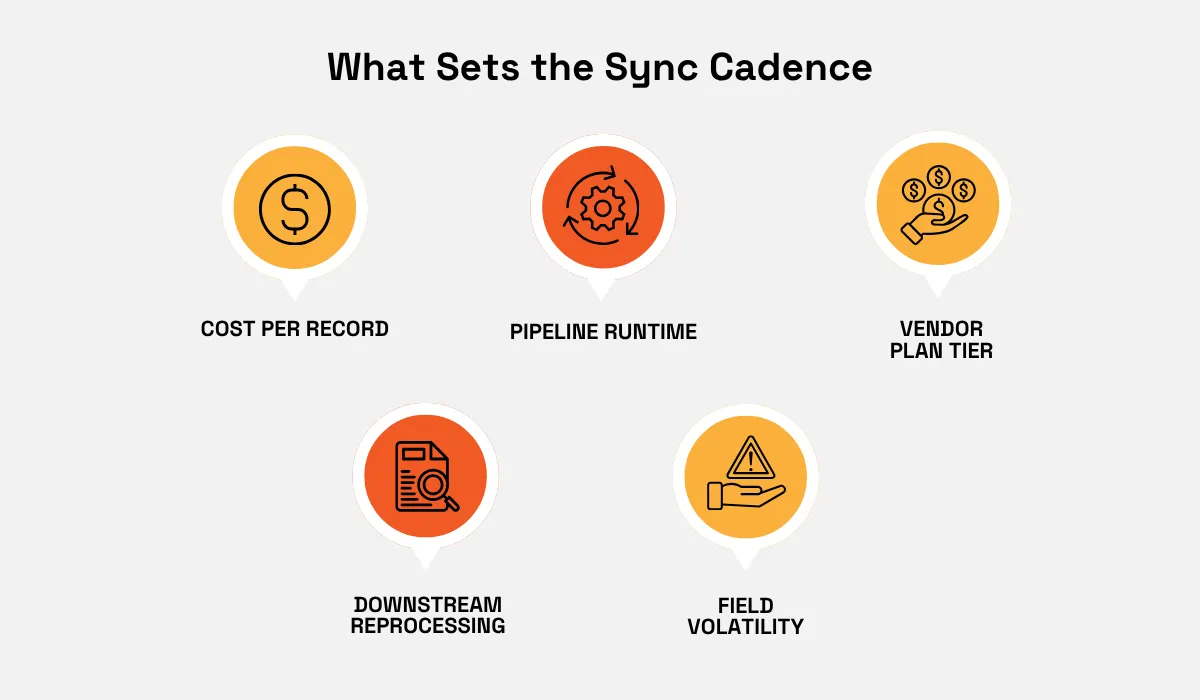
Depending on your operations and the data provider, several aspects affect or even set the sync cadence.
Source: Veridion
As an example, a high cost per record or steep vendor price tiers can decide the schedule for you, since enrichment priced per call turns cadence into a budget question.
In fact, a team paying per record often runs monthly refresh cycles because weekly costs four times as much.
Or consider downstream reprocessing, which is an internal constraint.
If scoring models, routing rules, and territory assignments recompute whenever records change, a faster sync means more recomputation to schedule.
A less frequent cadence can start becoming an issue, as a lot can happen between refreshes.
Consider the research from Challenger, Gray & Christmas, which looked at CEO turnover patterns, with the following findings.
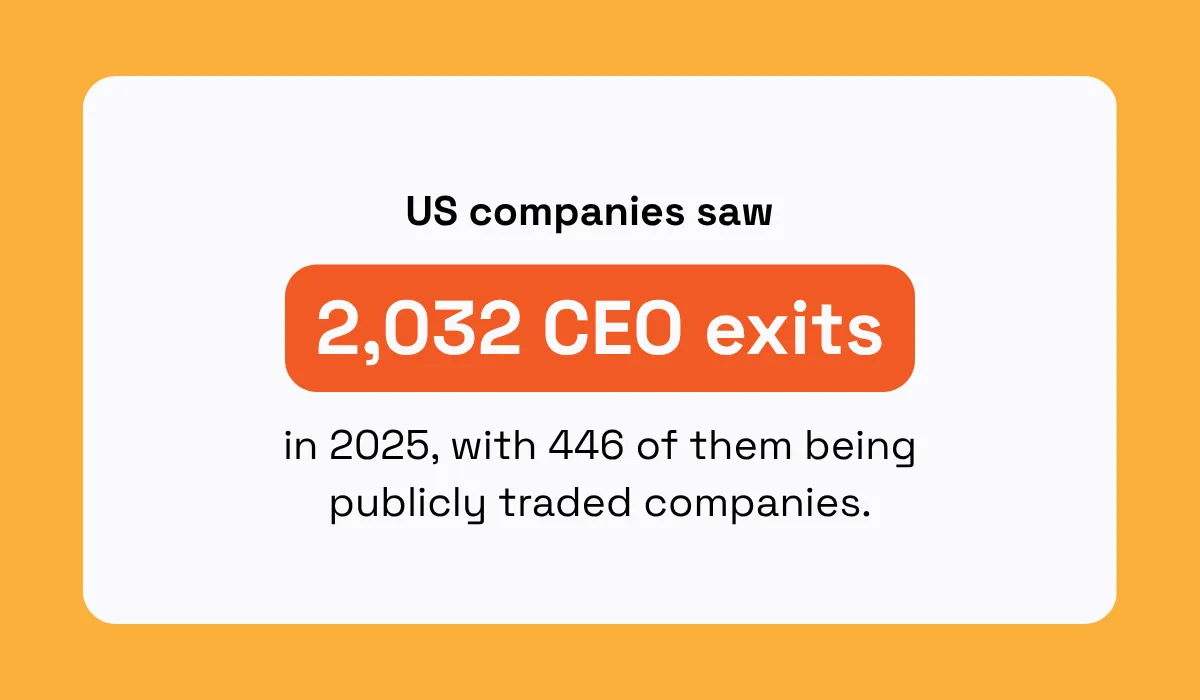
Illustration: Veridion / Data: Challenger, Gray & Christmas
What’s more, there were 383 exits in Q4 alone, meaning a team might be routing accounts to a decision-maker who left, or sending a renewal sequence written for someone no longer in the role.
Or consider changes that are less publicly visible, like a headcount band shifting after a hiring round, an office opening in a new country, or a product line moving the company's industry classification.
In each of these cases, a monthly or weekly update might be needed.
And when business processes need even faster updates, like inbound lead routing where the decision happens in minutes, then it's time to consider additional options or a more real-time approach.
That being said, batch enrichment covers a wide range of operations, and many teams run it permanently alongside whatever they add next.
Level 3: Event-Driven Real-Time Enrichment
Real-time enrichment updates records the moment a key event happens, such as a new lead submission or a specific account activity, rather than waiting for the next scheduled cycle.
In practice, event-driven means the update is triggered rather than requested.
An event fires a webhook, the webhook calls an enrichment API, and the response is written back to the record within seconds.
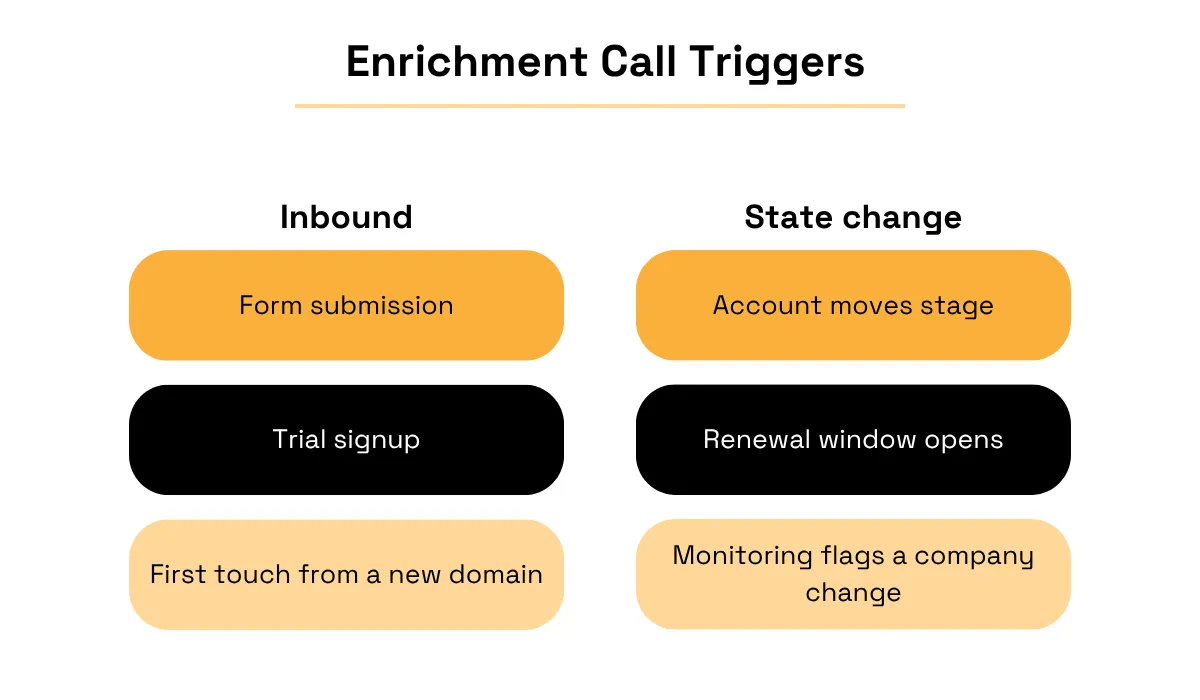
Which events should trigger that call divides into two groups, shown below.
Source: Veridion
Inbound events create a record that didn't exist before, so enrichment runs on a company you have never seen.
As for state changes, events apply to accounts already in your system, where something about the company or the relationship has moved, and the stored data is now suspect.
The distinction matters because the two need different pipelines.
Inbound triggers come from your own forms and product, while state-change triggers usually come from a monitoring service that reports when something about a company changes.
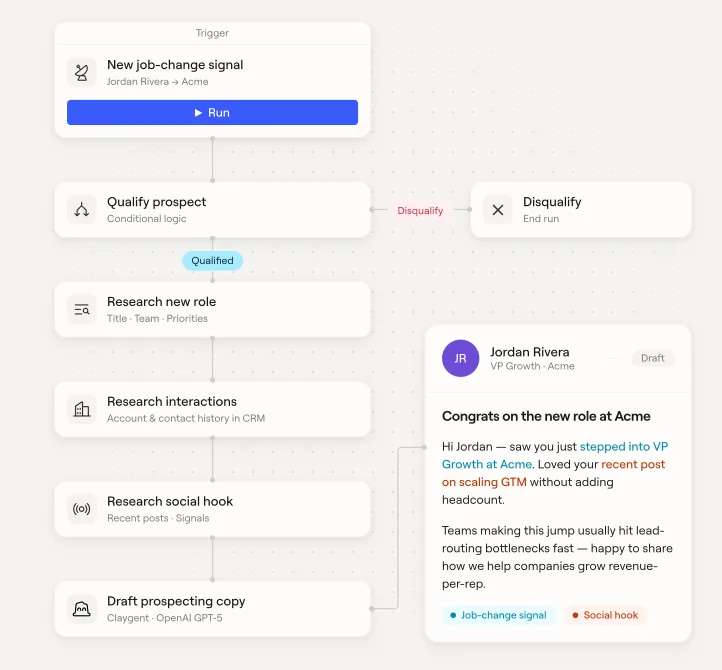
Workflow builders make this visible, and the example below shows a job-change signal starting an enrichment and outreach sequence.
Source: Clay
In Clay's workflow, a job-change signal triggers a qualification step, and records failing the conditional logic exit the run.
What makes this event-driven rather than scheduled is that nothing here runs on a clock.
The signal arrives, the branch is evaluated, and the record is either enriched and acted on or dropped within the same run.
This becomes worth building once company data is a direct part of the customer experience or the revenue workflow, not a supporting reference a rep occasionally checks.
The cost of staying on level 2 past that point is that teams keep deciding on incomplete information, which slows response time on inbound leads and loses conversions that depend on fast, informed follow-up.
Response times across the market show how much room that leaves.
In fact, Optifai analyzed CRM timestamp data from 939 B2B software companies between mid-2025 and early 2026, and found the average first response to an inbound lead took 47 hours.
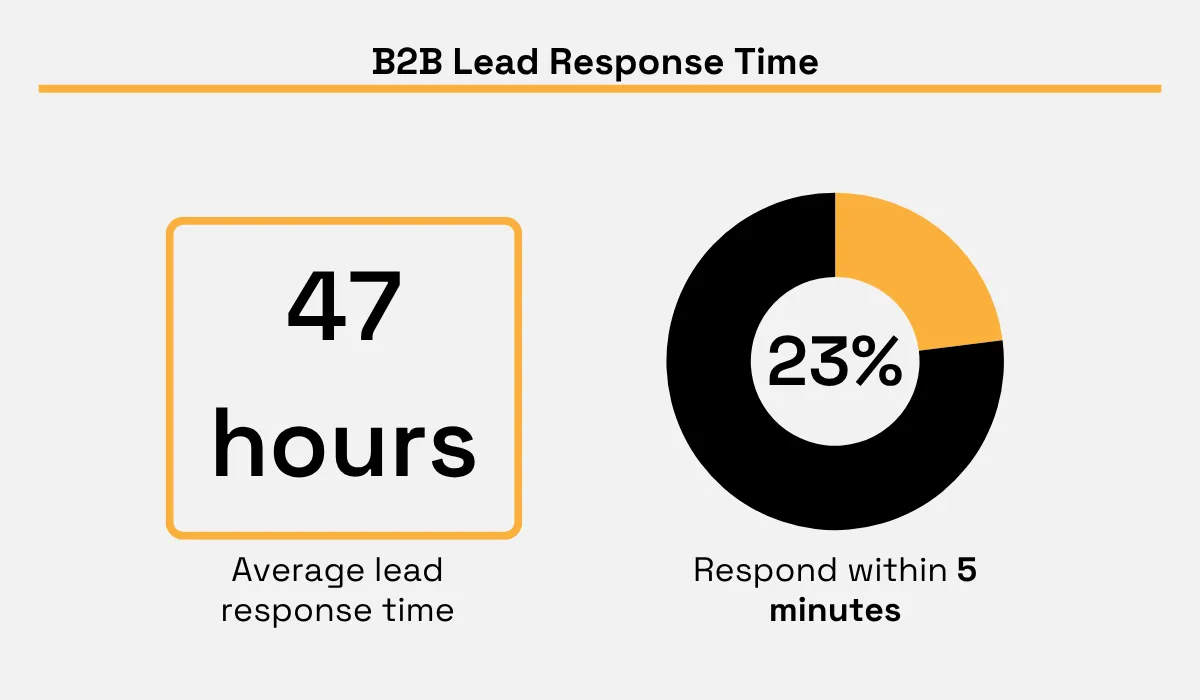
Only a small percentage responded to leads within 5 minutes, which leaves a lot of opportunities for improvement.
That’s because the same study found close rates fell from 32% for leads contacted within five minutes to 12% after a day.
Poor data enrichment isn't the only reason a team might respond slowly, but a record that arrives complete removes one of the reliable causes of delay.
Level 4: Embedded Firmographic Layer Inside the Product
The most advanced stage isn't about enriching your own internal systems at all.
It's building firmographic intelligence directly into your own product, so your customers get company intelligence, segmentation, or enrichment as a built-in feature.
This is best for platforms that need to provide those capabilities to their own customers rather than to internal go-to-market teams.
Research on this type of data monetization suggests the gap between companies that do this well and everyone else is wide.
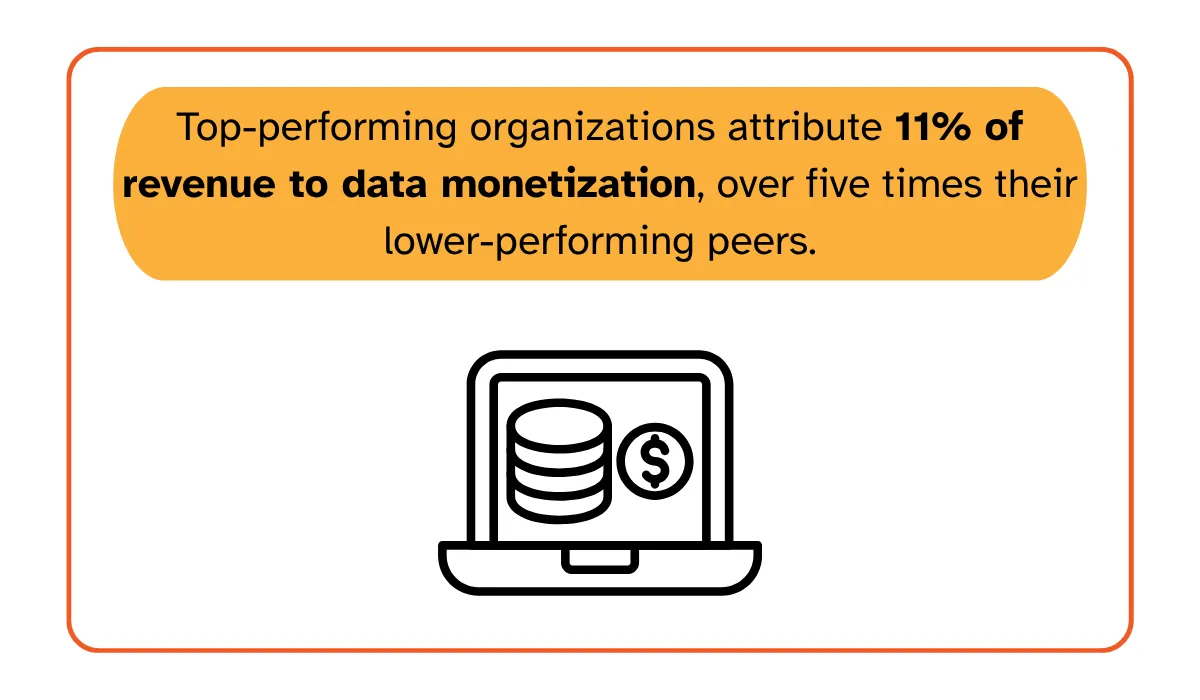
The figures found by MIT's Center for Information Systems Research cover data products broadly rather than firmographic data specifically, but the pattern holds: the companies treating data as an offering see it on the revenue line.
A procurement product that shows supplier detail, a fintech that verifies businesses during onboarding, and a marketing platform that segments accounts are all doing the same thing, which is selling company data as part of what the customer bought.
The clearest example of a platform making this type of move is HubSpot, which decided a B2B data provider’s capabilities were worth acquiring outright.
In November 2023, HubSpot announced an agreement to acquire Clearbit, with customers now getting company enrichment as a feature of the platform they already pay for, rather than as a separate subscription.
What changes at this level is mostly commercial rather than technical, as this table below shows.
Internal | Customer-facing | |
|---|---|---|
Licensing | Internal-use licence is sufficient | Requires redistribution rights, a separate contract |
Pricing | Scales with your employee count | Scales with your customer count or usage |
Latency & caching | Set by your own internal workflow | Set by your product's response time and licence terms |
Failure & support | An outage is an internal inconvenience | Visible to your customers, in your product |
What can change are the technical requirements.
Since your product's own response time now sets the latency budget, a provider outage becomes something your customers see.
Still, moving data out of the back office and into your product has the potential to transform it from an operational expense into a direct revenue driver.
Scaling Without Switching Providers
Each of these four levels asks something different of a data provider, which is why the provider you choose at Level 1 determines how easily you reach Level 4.
Switching mid-scale-up is disruptive for reasons that have little to do with the contract.
Every internal record connected to the old provider's company identifiers has to be re-matched, taxonomies rarely align between vendors, and any rule written against the old field values needs rewriting and retesting.
Martin Thompson, Owner of ITAM Review, describes a second cost that appears once a vendor has been in place for a while.
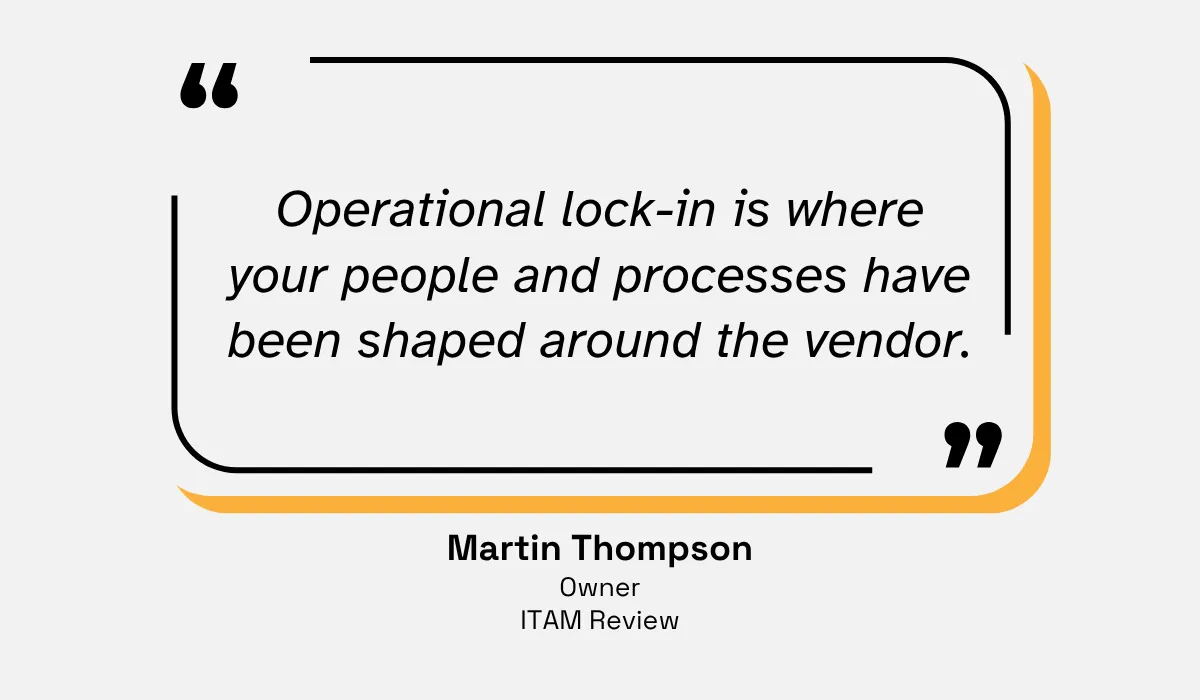
Illustration: Veridion / Quote: ITAM Review
Thompson calls this operational lock-in, and distinguishes it from the contractual kind.
Your team learns the vendor's field definitions and builds runbooks around their delivery format.
Any downstream logic then assumes their behaviour, none of which appears in a renewal negotiation but all of which has to be rebuilt.
Flexible delivery is what prevents that, because a provider offering several routes into your systems can support the level you're at now and the one you move to next.
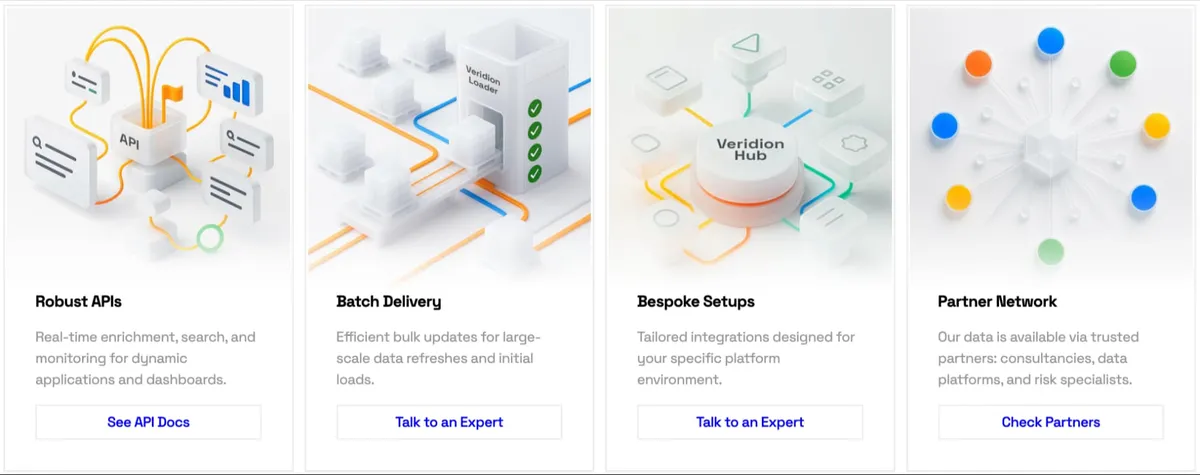
Veridion offers this range directly.
Source: Veridion
Its APIs handle real-time enrichment, search, and monitoring for the event-driven pattern, while batch delivery covers bulk refreshes.
Plus, bespoke setups are built for a specific platform environment where an embedded feature needs something standard delivery doesn't provide.
Mapped against the maturity model, that means one relationship covers all four stages.
A team can start by pulling files for manual work, schedule those same files as a batch refresh, move to the API, and even license the data for a customer-facing feature without changing the underlying records.
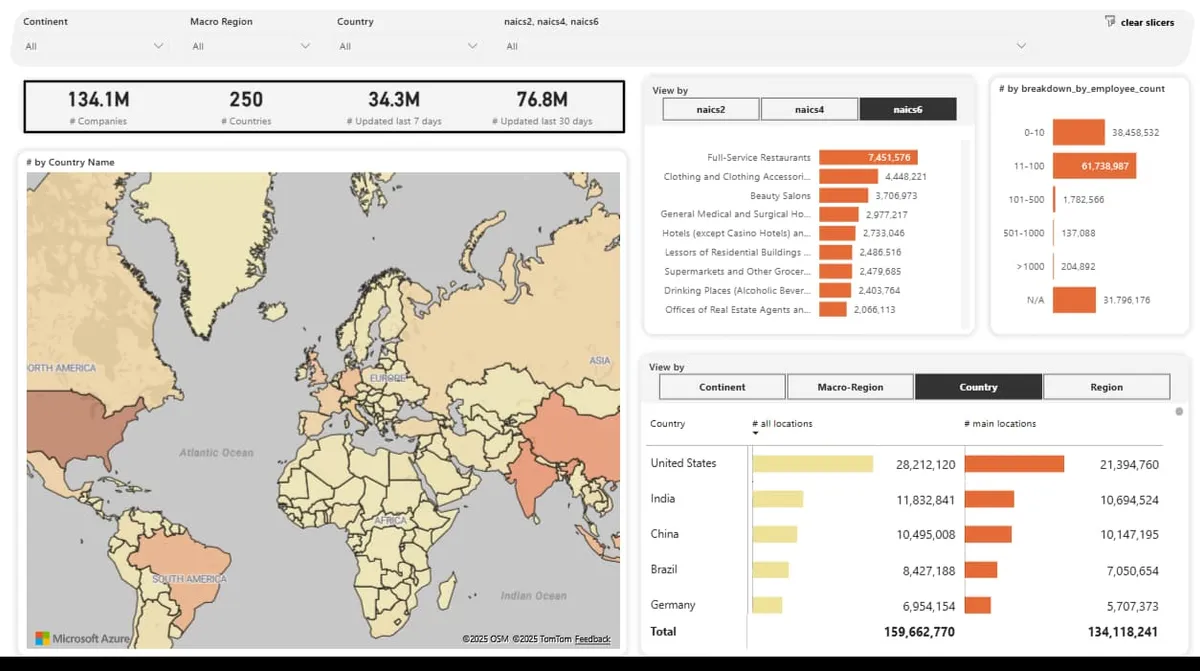
Underneath every delivery method is the same continuously refreshed picture of the business world, shown below.
Source: Veridion
The database covers every country and continent, with breakdowns by industry classification, employee band, and location.
Because the identifiers and attribute definitions stay constant across API, batch, and bespoke delivery, moving between levels changes how the data arrives rather than what your systems have to relearn.
Ultimately, that's the practical argument for choosing a provider on delivery range rather than on the pattern you happen to need today.
Conclusion
And there you have it. Four levels, with most teams belonging somewhere in the middle rather than at the top.
What matters is knowing which level you're on, what it's costing you, and what the next one asks for.
Pick the provider that can follow you there, and the move becomes a configuration change instead of a project.
Articles
Discuss how these trends affect your organization.
Our analysts are available for a short call. Bring a specific question and we will ground it in the data.
Insights
Keep reading
More analysis, research, and outcomes grounded in live company intelligence.
A Closer Look at the Top B2B Data Enrichment Companies Businesses Rely On
Struggling to find reliable firmographic data providers? Uncover the top B2B data enrichment companies that businesses trust to fuel growth.
How to Build a Firmographic Lead Scoring Model That Actually Predicts Revenue
Looking to build a firmographic lead scoring model? This guide will show how company data can help prioritize leads and improve revenue predictions.
Which Online Business Data Providers Stand Out in Today's Market?
This article will highlight online business data providers that businesses trust for accurate company information and actionable insights.