Insights / Articles
How to Find a Company's Employee Count
Six ways to find a company's employee count, from LinkedIn and databases to annual reports and registry filings.

- A company's LinkedIn employee count may tell a different story from its reported workforce.
- Different databases can give different employee counts for the same business.
- Company filings may include people the business manages but doesn’t employ.
- Finding consistent employee counts becomes harder when researching companies at scale.
Whether you're comparing companies, building a list of potential customers, or sizing up a market, an employee count gives you a quick way to understand a business's size.
But two numbers attached to the same company can tell different stories. One may be out of date, while another may count a different group of people.
Those differences can affect which companies you include, how you compare them, and what conclusions you draw.
1. Decide How Precise the Number Needs to Be
The precision you need depends on what you plan to use the employee count for.
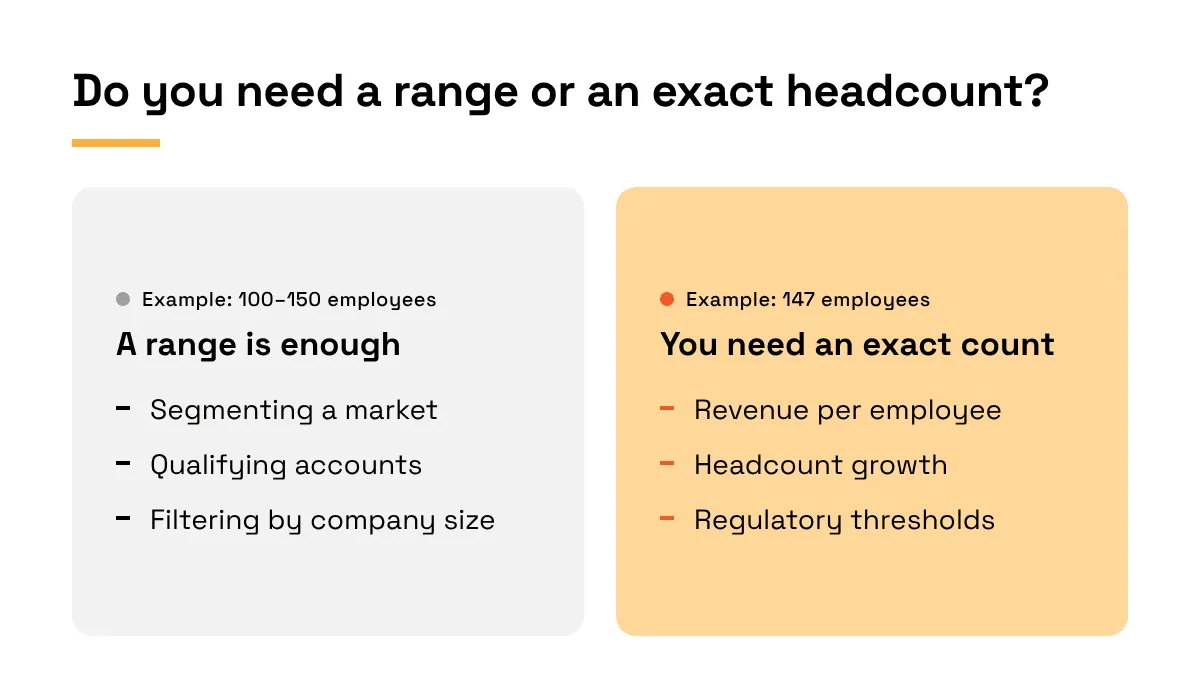
Suppose you are segmenting a market and only need to separate companies with fewer than 200 employees from those with 200 or more. A range of 100–150 already tells you that the company has fewer than 200 employees.
Knowing that the company has 147 employees wouldn’t change the segment, so spending time verifying the exact figure adds little.
However, the number matters more when you are going to use it in a calculation.
Say a company has $15 million in annual revenue and you want to compare its revenue per employee with other companies.
Knowing that it has somewhere between 100 and 150 employees puts its revenue per employee somewhere between $100,000 and $150,000.
That range is wide enough that you can’t confidently compare the company with others on revenue per employee. A more accurate headcount would narrow that range and make the comparison more useful.
So before you start looking for the company's employee count, think about how precise the number needs to be.
Source: Veridion
A broad range may be enough when you only need to know roughly how large a company is. But if you need it for something like revenue per employee or employee growth, it’s worth taking the extra time to get a more exact figure.
2. Check the Company's LinkedIn Page
A company's LinkedIn Page can give you a rough idea of how many people work there.
For example, Accenture, a global professional services company that provides consulting and technology services, is listed as having 10,001+ employees. That can be enough when you only need a general sense of how large the company is. But the number of employees can change without that range changing with it.
LinkedIn says company-size information is primarily based on the size entered by a page admin. So if the company grows and the page isn’t updated, the range can stop reflecting its current workforce.
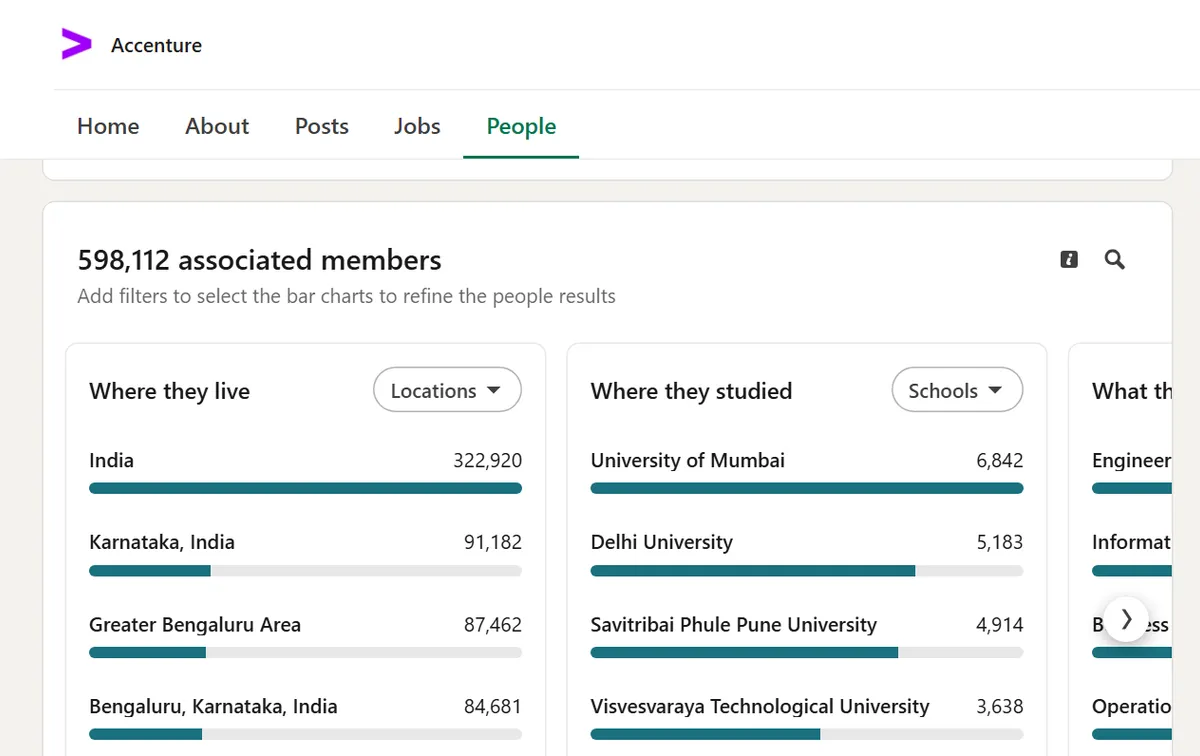
If you need a narrower estimate than the range provides, the company page also shows a separate count of employees associated with the company. Accenture, for example, currently lists 598,112 associated employees.
Source: LinkedIn
LinkedIn builds that number from members who add the company to the experience section of their profiles and associate themselves with its page. So if someone works for the company without adding it to the experience section of their LinkedIn profile, they wouldn’t be included in the count.
The count can also take time to update when people join or leave the company.
A new employee may not appear straight away, while someone who has left may still be included for a while. LinkedIn says it can take up to 30 days for those changes to appear in the count.
Accenture's figures show why you should treat the associated employee count as a separate measure from the company's reported workforce.
In fact, the company reported approximately 814,000 employees at fiscal 2026 year-end, considerably more than the number currently associated with its LinkedIn page. The difference makes sense because Accenture is reporting how many people it employs, while LinkedIn is counting how many people are associated with its page.
So the associated employee count can give you a more specific estimate. But when you need to know how many people the company actually employs, you’ll need to look beyond its LinkedIn page.
3. Compare Estimates in Company Databases
You may also find different employee counts for the same company in different databases.
That doesn’t necessarily mean one number is wrong. The difference may come from the sources each provider uses and how it determines the number it reports.
For example, Global Database builds its company records from government registries. For companies where employee numbers are reported in statutory accounts, it uses those filed figures.
However, when filings aren’t available, it can provide estimated employee numbers, which it labels as modelled rather than presenting them as filed figures.
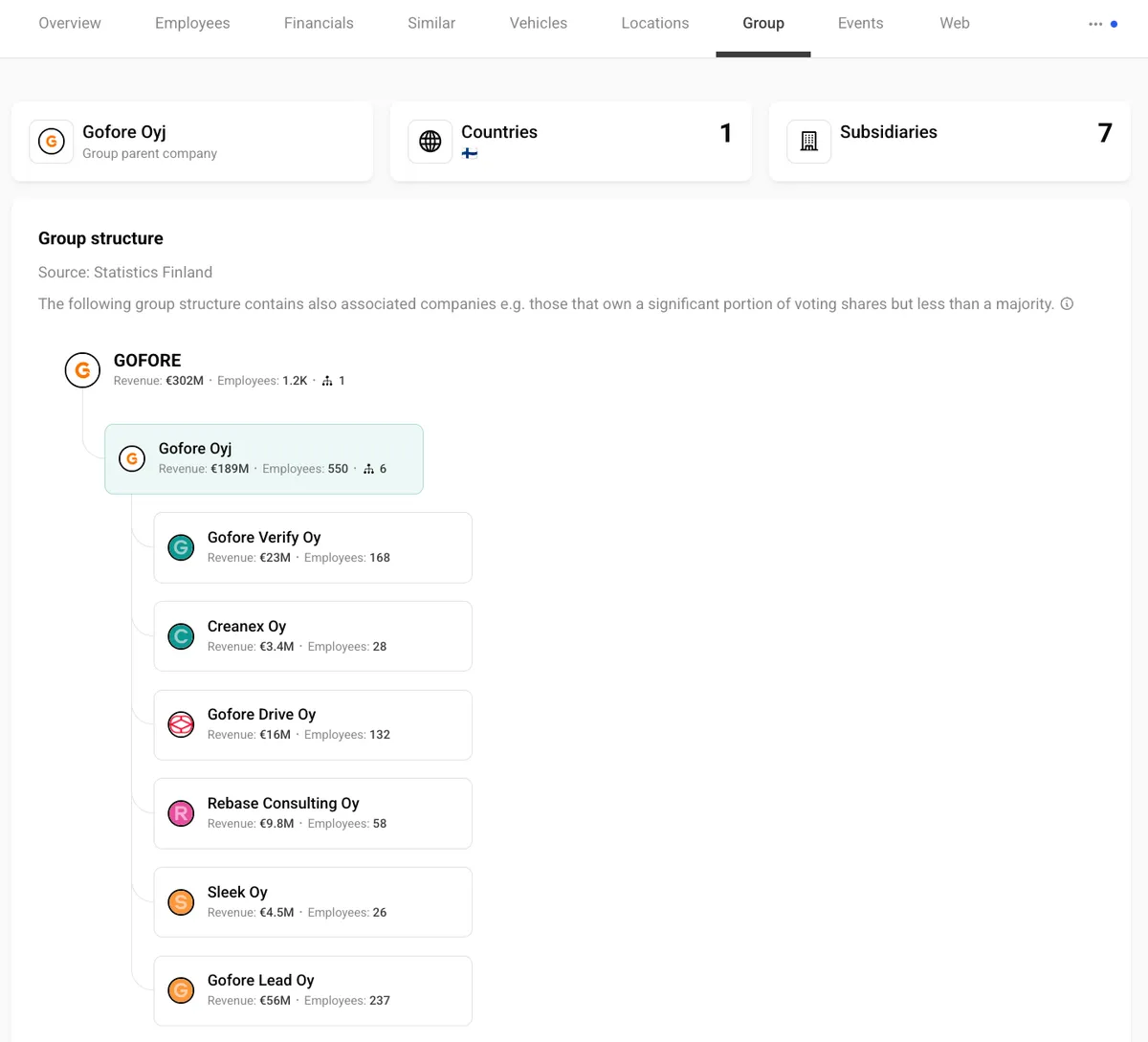
Vainu takes a different approach. Alongside official employee figures, it uses a model to estimate company size from a company's website and other open-source content.
The model considers signals such as web traffic, the number of office locations, detected web technologies, and phrases on the company's website to predict the employee-count range it considers most likely to be correct.
Source: Vainu
So if you search for the same company in both databases, you may get different employee counts. One figure may come from a company filing, while another may be a modelled estimate based on signals about the company. Both figures may be useful, but the difference can affect which companies make it into your results.
For example, suppose you are looking for companies with at least 1,000 employees to identify larger businesses for a sales campaign.
One database lists a company at 900 employees, while another puts it at 1,200. Using the first figure would leave the company out of your list, while the second would put it in.
So compare the figures across databases, then check where each provider got its number and what it represents. That will help you decide which estimate to use for your particular purpose.
4. Look for Figures the Company Publishes Itself
Companies often publish their employee count on their websites and in other public company materials. You can usually find a broad employee count on pages such as:
- About or company overview page
- Careers page
- Press releases
Wipro, for example, describes itself as having 240K+ employees on its About page. Zurich gives a similar figure on its About page, describing its workforce as more than 65,000 employees.
Companies may use an approximate figure when they describe their workforce this way. That gives you a sense of the company's size, but it doesn’t give you the exact headcount.
Wipro's “240K+” means the company has at least 240,000 employees. So it could have 241,000, 250,000, or more.
Zurich's broad number works the same way. You know it has more than 65,000 employees, but you don’t know the exact number.
If you need a more precise headcount, you may find one in the company's other publications, such as:
- Annual reports
- Investor presentations
- Sustainability reports
Henkel provides a good example.
In a January 2026 press release, it said it had around 47,000 employees. Its annual report reports 47,200 employees as of December 31, 2025, and specifies that this includes permanent employees only, excluding apprentices.
That extra detail tells you more than how large Henkel is. You now know when the headcount was measured and which employees the company included, so you can interpret the 47,200 figure more precisely than “around 47,000” on its own.
If the company's own publications still leave you without the level of detail you need, its formal records may provide a more specific figure.
5. Check Annual Reports and Registry Filings
Company filings can give you an employee count the company has reported, along with the date it applies to and which workers it counts.
For a U.S. company that files with the SEC, start with its latest Form 10-K.
SEC rules require registrants to disclose human-capital information, including the number of people they employ, to the extent it is material to understanding their business. You can find the filing through SEC EDGAR.
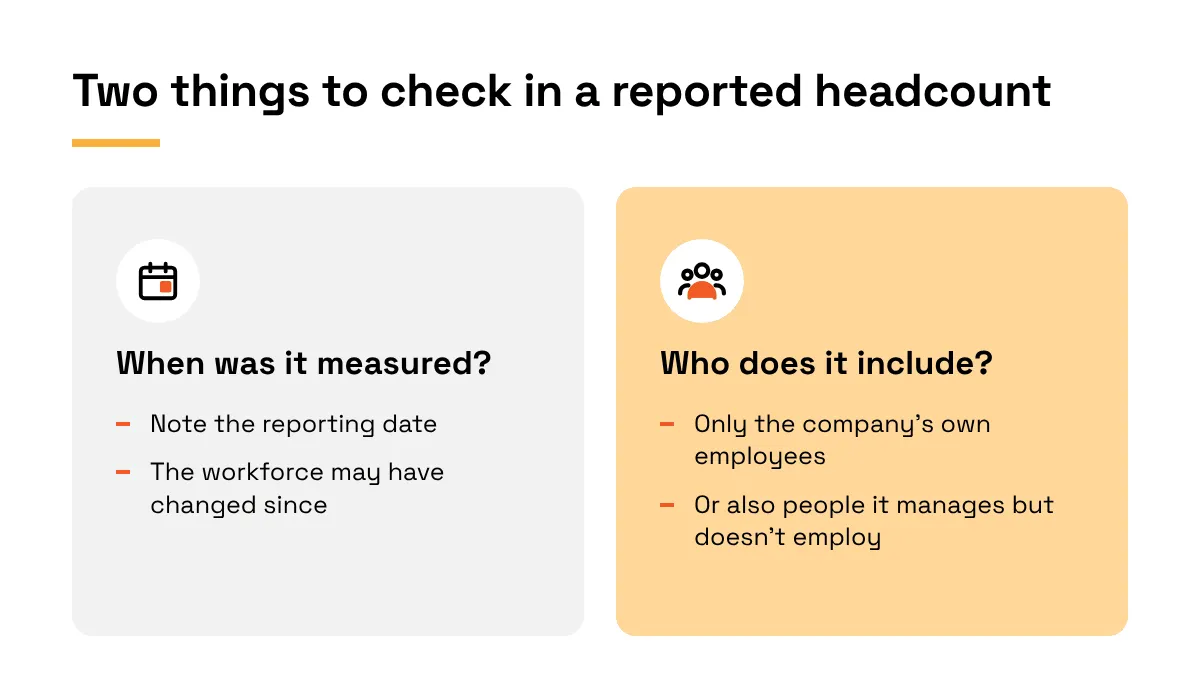
Once you find the number, check the date next to it. Kyndryl, which designs and manages technology systems for businesses, reported approximately 72,000 employees in 60 countries as of March 31, 2026. People may have joined or left since then, so its current headcount could be different.
That's not the only thing to check, though. A filing may also include people a company manages but doesn’t employ itself.
Stride, which provides online learning services to schools, reported approximately 9,200 employees as of June 30, 2026. The same filing said it managed about 9,600 teachers. Of those teachers, 3,700 were employed by the public schools Stride managed rather than by Stride itself.
So the 9,600 figure includes teachers employed by the schools and not just by Stride. If you were looking for Stride's own employee count, you would use the 9,200 figure.
Source: Veridion
When you check a UK company's accounts, there's another detail to watch for.
Those accounts can report the average number of people employed during the financial year, rather than a headcount on one particular date. Section 411 of the Companies Act 2006 requires the notes to a company's annual accounts to disclose this average.
The company works out the average by adding the number of employees for each month and dividing by the number of months in the financial year. You can find these accounts through Companies House.
So when you use a filing to compare companies, check whether each figure is a headcount on a particular date or an average over the year.
Also check whether it counts only the company's own employees. That way, you're comparing figures that measure the same thing.
6. Get Consistent Headcount Data at Scale
For a single company, you can look up its employee count and check when it was reported and which employees it includes.
But when you need employee counts for many companies, repeating those checks one by one takes much more time.
Veridion can reduce that manual work.
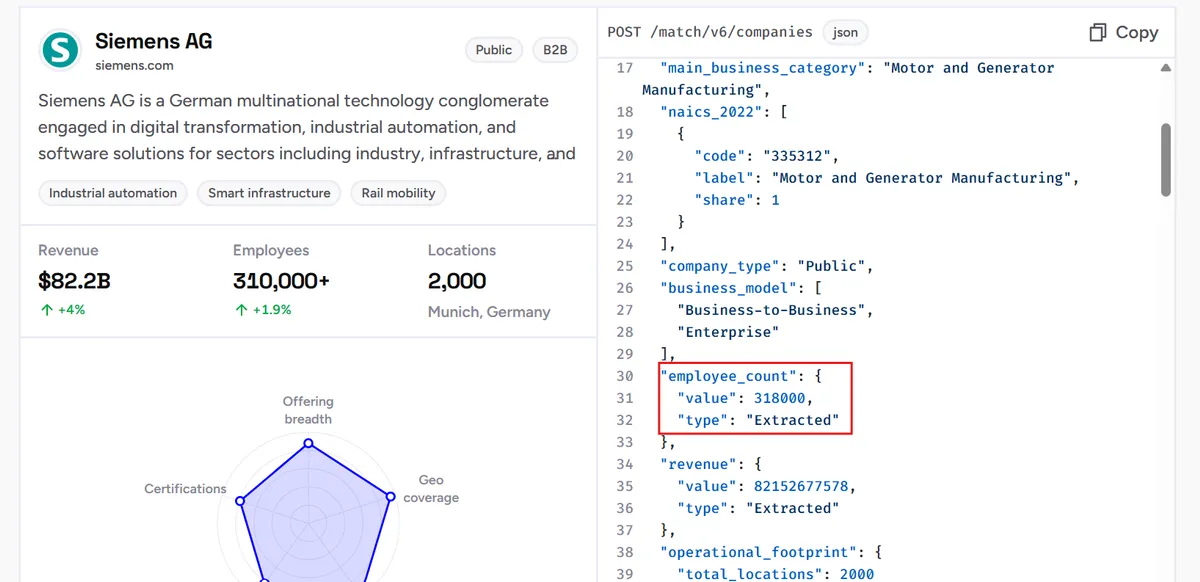
Its Match & Enrich API uses a company's name and other details, such as its website or address, to find the matching company profile.
If an employee count is available, the API returns it alongside other company details. This is useful when you already maintain company records and want to add headcounts to them.
Source: Veridion
If you're researching an industry and need employee counts for many companies together, you may prefer to receive the records in one file.
Veridion's batch delivery service lets you request a sample of company records for the market and geography you're researching. You can then review the sample first to check that it covers the companies and information you're looking for.
Once you've reviewed the sample, Veridion can send the full dataset as a CSV, JSON, or Parquet file.
You can open it in a spreadsheet and sort companies by employee count to compare their sizes, or load it into your data warehouse to analyse headcounts alongside other company information.
However, the employee counts in that file may not all come from the same source.
Veridion's Data Dictionary labels them as Extracted or Modelled. An extracted count comes from a published source Veridion uses. A modelled count is an estimate generated by Veridion's proprietary machine learning algorithms.
That distinction matters when you compare companies.
If you're grouping businesses into broad employee-size bands, a modelled estimate may be enough. But if you need a headcount the company reported itself, check the underlying source where available.
How Does Veridion Compare to Other Company Data Providers for Headcount Data?
Employee-count providers differ in how they calculate or source their figures and how you can access the data.
The table below compares Veridion, Dun & Bradstreet (D&B), ZoomInfo, Moody's Orbis, OpenCorporates, and Coresignal across these differences.
Provider | Employee-count format | Where the figure comes from | Private companies | Update frequency | Delivery |
|---|---|---|---|---|---|
Veridion | Exact number, labelled Extracted or Modelled | Published sources (Extracted) or Veridion's ML models (Modelled) | Yes, across 744.5M companies | Data points refreshed weekly | API; batch (CSV, JSON, Parquet) |
Dun & Bradstreet | Exact number for one entity or consolidated with branches and subsidiaries; ranges in some products | Mixed; each figure labelled actual, estimated, or modelled | Yes | Not publicly specified; each figure carries a reporting date | UI (D&B Hoovers), API, batch |
ZoomInfo | Exact number and range, plus employee growth | Public sources, data partners, user contributions, and in-house research | Not publicly specified | Continuous monitoring; no set interval | UI, API, batch |
Moody's Orbis | Employee numbers among company metrics | Mainly official registries, plus external providers | Yes | Mostly weekly | UI, API, bulk feeds |
OpenCorporates | Text field, not available for every company | Company registries | Registered entities, including private ones | Not publicly specified; each record dated | UI, API, bulk extracts |
Coresignal | Professional-network count, size range, and inferred estimate | Professional-network profiles; inferred estimate is modelled | Where data exists | Varies by dataset (daily to quarterly) | Self-service tools, API, batch (Parquet, JSONL) |
Veridion and D&B fit when you need comparable counts across large lists, since both label whether each figure was reported or modelled, and D&B adds consolidated group-level counts.
ZoomInfo and Coresignal suit sales prospecting, where employee growth or professional-network presence matters more than an exact figure.
Orbis fits when you need headcount alongside financials and ownership, while OpenCorporates works for registry checks but often lacks employee counts.
Conclusion
If you're grouping companies into broad size bands, LinkedIn's company-size range or a database estimate may be enough. But when a decision depends on a company's actual workforce, you'll need to check who the figure counts, when it was measured, and whether the company reported it.
That kind of checking is manageable for a handful of companies. When you're working with hundreds or thousands, finding and verifying each count becomes a much bigger job. You need a way to bring the figures together while keeping track of where they came from.
Veridion helps with this through its Match & Enrich API and batch delivery service, which let you enrich existing records or source company data in bulk.
Articles
Discuss how these trends affect your organization.
Our analysts are available for a short call. Bring a specific question and we will ground it in the data.
Insights
Keep reading
More analysis, research, and outcomes grounded in live company intelligence.
How to Find a Company's Competitors
Industry codes miss indirect and private competitors. Here is how to find a company's competitors from what companies actually sell.
5 Types of Market Intelligence You Need to Know About
Explore five different types of market intelligence that can shape your competitive edge. Find out which ones your team should prioritize.
9 Essential Sources of Market Intelligence
Want to boost your market knowledge? These 9 market intelligence sources will show you where to look and how to apply the insights.