Insights / Articles
Company Data Enrichment for Private Equity: Fix the Deal CRM Before Another List Upload
Three list entries and one declined deal can be one CRM record. Follow six steps of company data enrichment for private equity before your next upload.

- A company on several lists or deals is one company record, with one ID to protect.
- Cleaned names and domains help comparison, but registry IDs confirm identity.
- Veridion provides matched company profiles and additional company information.
- Test a small import and reconcile every row before the full upload.
Every target list imported into a deal Customer Relationship Management (CRM) system can create duplicate records of companies the firm already knows.
Company data enrichment for private equity (PE) firms prevents this by matching each incoming company against existing records before adding details such as activity, size, and ownership.
Before the upload, the team also has to protect the record IDs, linked deals, notes, and owners already in the CRM.
Below, we cover how to do this in six steps.
How to Prepare the CRM and Incoming Company List
Preparation comes down to recording what is already in the CRM and making the incoming rows comparable to it.
Both are done before any matching starts, so the team knows what must be preserved and each new row can be checked against it.
Map Company Records and Preserve CRM IDs
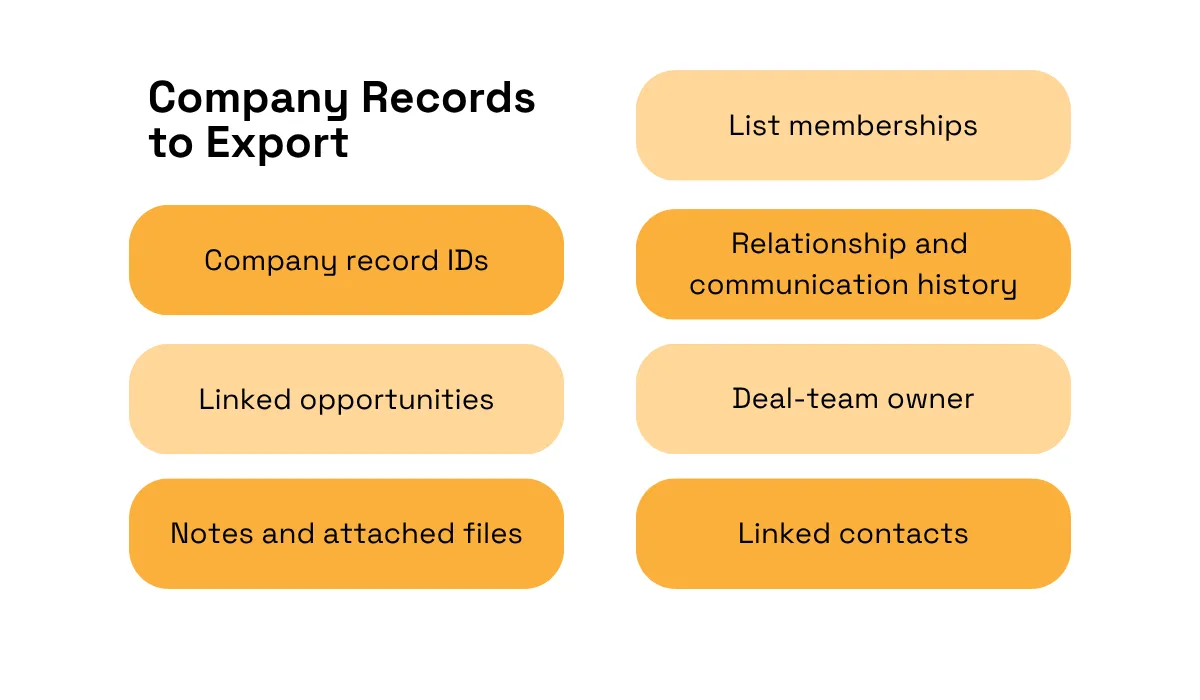
Before any row is matched or imported, export the company records as they are today.
This export is the reference point for every later step, since it shows which IDs exist and what is linked to each one.
The list below shows what it should include.
Source: Veridion
Of these, the record ID matters most.
Opportunities, notes, and contacts are linked to a company through its ID, so a record that is deleted and created again under a new ID loses those links.
Ownership and relationship history matter for a similar reason, since they show who at the firm knows the company and when they last interacted with it.
It also helps to understand how your CRM stores a company in the first place.
CRMs built for private capital firms, such as Affinity, keep the company record separate from the lists and deals where the company appears.
In Affinity, each list a company appears on gets its own list entry, and each deal gets its own opportunity, but all of them link back to one company record.
The example below shows this for a fictional company, Norrvik Maintenance AB, which we’ll use throughout this guide.
Where Norrvik Maintenance AB appears | Record type | Linked company record |
|---|---|---|
Nordic add-ons list | List entry | ORG-1042 |
Industrial services 2024 list | List entry | ORG-1042 |
Acquisition deal, declined in 2024 | Opportunity | ORG-1042 |
All three rows link to the same record, ORG-1042, so they describe one company, not three duplicates.
For a company like this, the team should preserve its record ID, each list entry, every linked opportunity with its status, and the notes attached to them.
So when Norrvik appears in a new list, the incoming row should be mapped to ORG-1042 instead of being saved as a new company.
Standardize the Existing Records and Incoming Rows
Before a new company list can be imported or matched against existing deal records, it has to be normalized, meaning its values are converted into one consistent format.
The table below shows a few rows from an incoming list before and after cleaning.
Import Row ID | Field | Original value | Cleaned value |
|---|---|---|---|
IN-01 | Name | NORRVIK MAINTENANCE AB | norrvik maintenance ab |
IN-01 | Domain | norrvik.se | |
IN-01 | Country | Sverige | SE |
IN-01 | Registration ID | 556123-4567 | 5561234567 |
IN-09 | Domain | (blank) | Missing, flagged |
Each incoming row also gets its own import ID, such as IN-01, so it can be traced through matching and import.
The cleaning itself is usually done in new columns next to the original ones, so the source values stay unchanged.
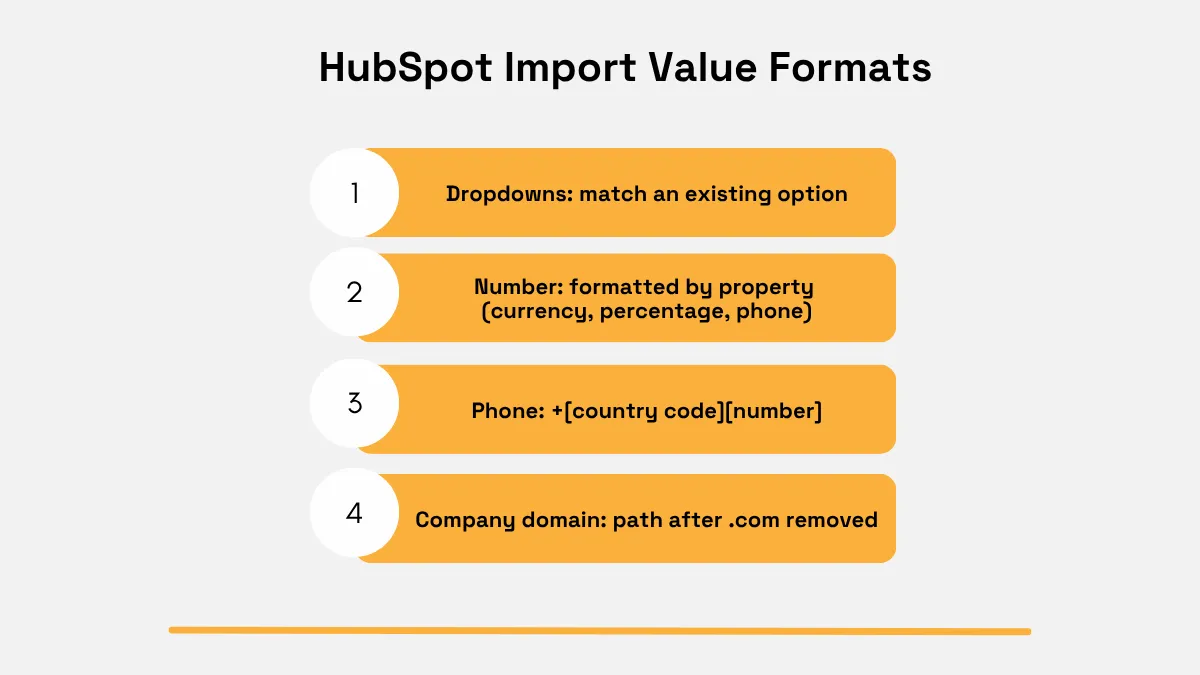
How the cleaned values should look depends on your CRM’s format rules.
In HubSpot, each field type has its own format, as some of the examples below show.
Source: HubSpot
A value in the wrong format can fail to import or change the record in ways the team didn’t plan.
Text fields such as company names are harder to standardize because unlike dropdowns or phone numbers, they have no fixed format the CRM can check them against.
Once a list has hundreds of rows, the same company name may be written in several ways, such as “Norrvik Maintenance AB” in one row and “Norrvik Maint. AB” in another.
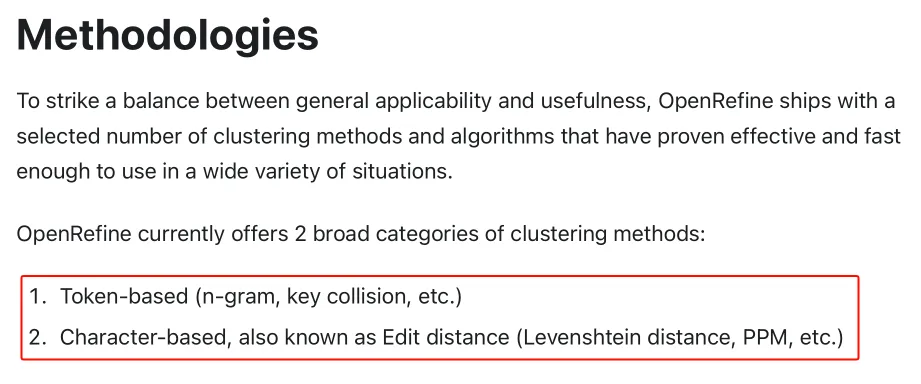
Finding every variation by hand takes too long, so teams often use tools like OpenRefine, an open-source data cleanup tool that groups different spellings of the same value automatically.
It does this with two types of clustering methods, shown below.
Source: OpenRefine
However, OpenRefine’s own documentation states that clustering works only at the level of spelling, and it warns that prediction by partial matching (PPM) tends to produce many false positives.
In other words, OpenRefine can tell that two values are spelled alike, but not whether they describe the same business.
Norrvik Maintenance AB and a similar-sounding company, Norrvik Mek AB, could be grouped together even though they are separate entities, while a company that changed its name would not be grouped with its old name at all.
Names that cluster together therefore need a registry ID, address, or domain to confirm they belong to the same company.
How to Match and Enrich Company Records
With the rows prepared, each one can be matched to a company and compared with the CRM before any field is updated.
Match Companies and Flag Uncertain Results
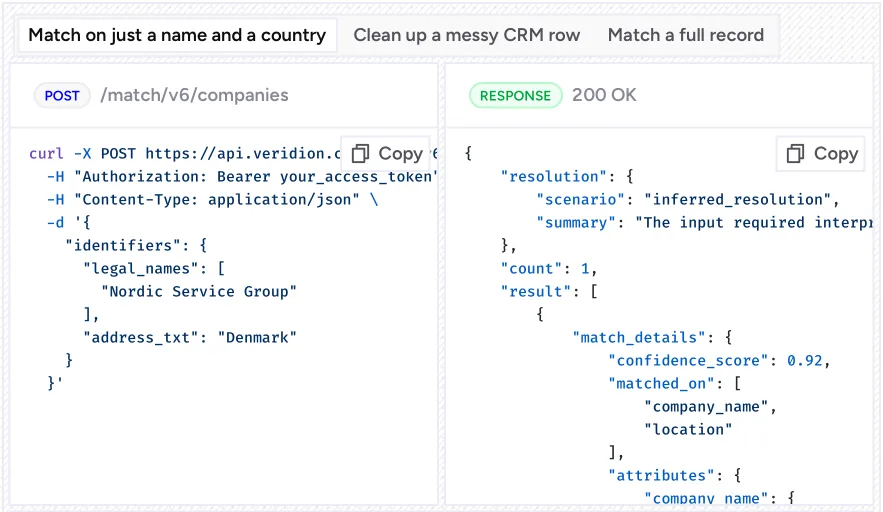
One way to resolve each prepared row to a real company is Veridion’s Match & Enrich service, which uses continuously updated data on every active company in the world.
It takes a partial or messy company record and returns the profile of the company it most likely refers to, together with the evidence for the match.
The example below shows a request that includes only a name and a country.
Source: Veridion
Every response states how the input was interpreted, how confident the match is, and which attributes it was based on.
The confidence score runs from 0 to 1 and depends on which attributes match, since a verified domain identifies a company more reliably than a name.
A match identifies the real company, and a separate check of its registry ID and domain against the CRM shows which existing record, if any, represents it.
Look-alike records need care at this point, as the two hypothetical cases below show.
Incoming record | Existing CRM record |
|---|---|
IN-09 Norrvik Mek AB | ORG-1042 Norrvik Maintenance AB |
IN-04 Norrvik Facility Services AB (norrvik.se) | ORG-1042 Norrvik Maintenance AB (norrvik.se) |
Neither of these records should be merged on a name, domain, or high score alone, since each needs a registry ID or address to confirm the company.
Similar names can belong to unrelated businesses, and one domain can be shared by several companies in the same group.
Parent and subsidiary records are a common example.
A subsidiary called Norrvik Maintenance Norge AS may share the parent’s name and domain, but it has its own registry number, so it needs a separate record linked to Norrvik Maintenance AB.
Fortunately, with an AI-powered data matching service, only the most uncertain of these cases need to be sent for manual review.
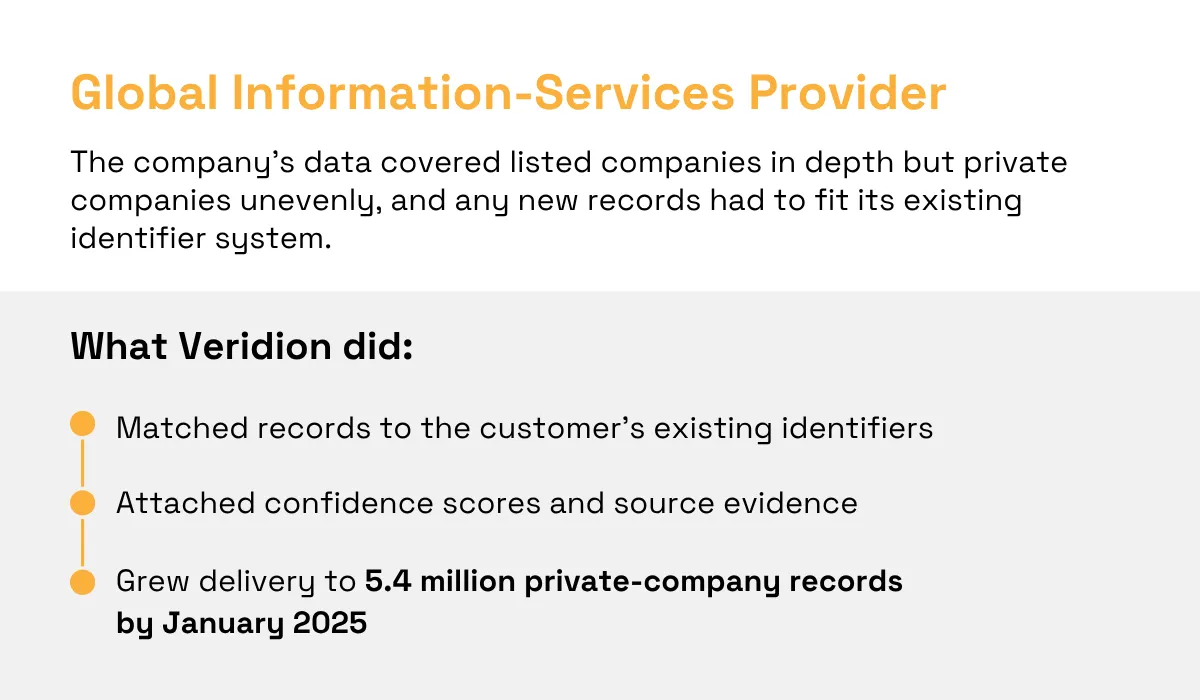
The rest can be matched automatically and at scale, as a global information-services provider did using Veridion.
Source: Veridion
Delivery started as a proof of concept in 2022 and grew in batches as the provider added more private-company records to its products.
Importantly, the new data was joined to identifiers the customer already used, so its existing records and IDs stayed in place.
In short, matching gives each incoming row a likely company and the evidence behind it, so large lists can be processed automatically.
Add Company Data With Clear Update Rules
Once a row is matched, the next decision is which company details to add to the CRM record.
Since external data can conflict with what the team has already entered, each field group needs a rule for when that data can change the CRM, as in the table below.
Field group | Example field | Rule |
|---|---|---|
Activity | Industry code, core offerings | Fill if blank |
Location | Main address, total locations | Refresh if newer |
Size | Employee count, revenue | Fill if blank; review if it differs from an analyst’s figure |
Corporate relationships | Ultimate parent | Send for review |
For example, under the Refresh if newer rule, if Norrvik’s address in ORG-1042 was last edited in March 2024, a new address collected in October 2026 replaces it, while an older value leaves the CRM unchanged.
The rule for missing values is simpler: an empty external field means no value was found, so it should never clear an existing CRM value.
Because company values change over time, the team also needs to know when each one was last confirmed.
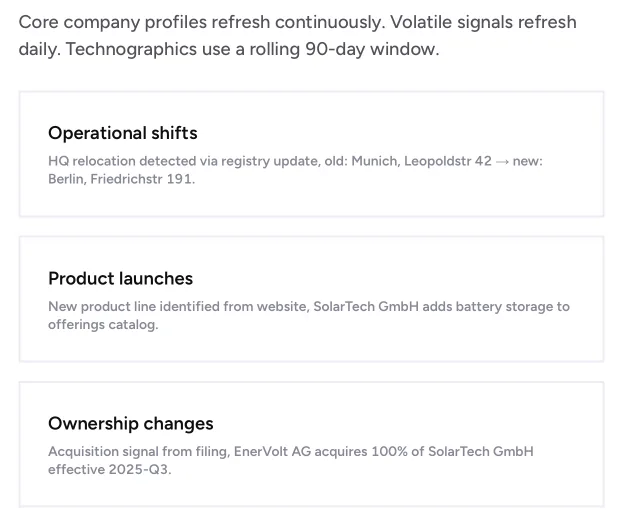
Veridion, for example, tracks 465 attributes per company and refreshes them at different intervals depending on the type of data, as shown below.
Source: Veridion
For every attribute, it records its sources and the date it was last collected, so the team can see whether a value is recent enough to replace what the CRM already has.
As a final note, pay close attention to how your CRM handles overwrites during an import.
In HubSpot, for example, the Don’t overwrite option can be selected for each mapped column, meaning the import fills a property only if the existing record has never had a value for it.
It’s important to configure settings like this before the import.
If new values overwrite analyst entries across hundreds of records, finding and restoring each one takes much more work than preventing the change.
How to Update the Deal CRM Safely
Matching and enrichment produce proposed changes, which need approval before they reach the CRM.
Before any change is imported, each row needs a decision, and the import needs a test.
Decide Which Records to Update, Create, Merge, or Hold
Every matched row now needs a proposed action, the evidence behind it, and the history or relationships to preserve.
The table below shows how this looks with four rows from our fictional batch.
Incoming row | CRM match | Action | Why |
|---|---|---|---|
Norrvik Maintenance AB | ORG-1042 | Update | Same registry ID and domain |
Norrvik Maint. AB | ORG-1042 and ORG-2388 | Merge ORG-2388 into ORG-1042 | Row matches one company, but two CRM records share its registry number |
Norrvik Maintenance Norge AS | None (parent: ORG-1042) | Create, link to parent | Separate legal entity |
Norrvik Mek AB | Possibly ORG-1042 | Hold | Name only; no registry ID |
Each action should follow from the evidence for that row.
Similar names or values can be misleading.
In fact, all four rows in our table look similar, yet only one is a direct update, while the others lead to a merge, a new record, or a decision by a reviewer.
Rows with no match need the same care, since a row isn’t a new company until the CRM has been searched by name, domain, and registry ID.
Held rows go to a named reviewer, usually the deal-team member who covers that market and can confirm or reject the proposed link.
Merges are harder to reverse than updates or new records, so they often need a second approval from the CRM administrator or deal-operations lead.
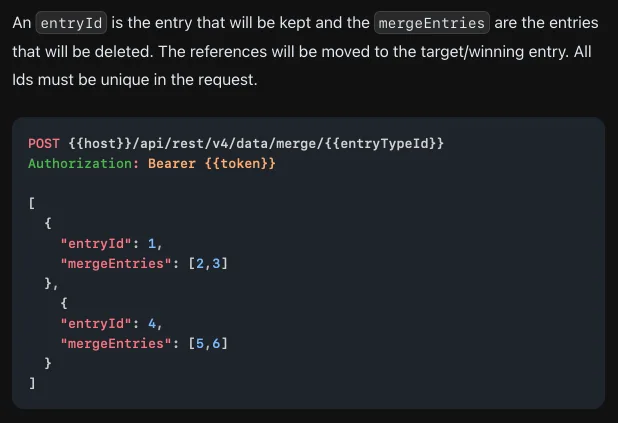
DealCloud, a deal management CRM for private capital firms, documents what happens during a merge.
Source: DealCloud
As the documentation explains, the kept entry receives all references from the merged entries, and the merged entries are then deleted.
That makes the choice of kept entry important, because any field values that exist only on the deleted entry can be lost.
In DealCloud, those values move across only when exactly two entries are merged with the option to fill empty fields, so it’s worth checking what each duplicate holds before approving the merge.
If the documentation in your own CRM doesn’t describe a way to undo a merge, treat it as permanent.
After a merge, record which of the old IDs now points to the kept record, so reports and future imports that use the old ID can be corrected.
Test a Small Import and Check What Changed
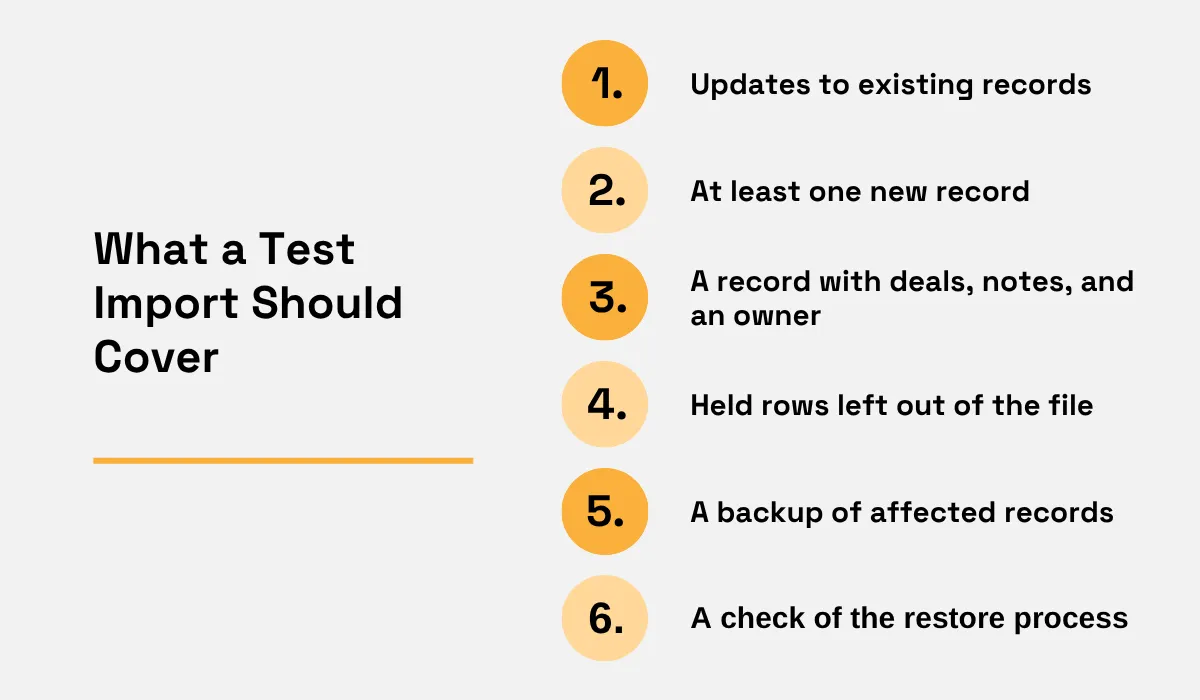
Before the full upload, test a small group of approved rows that covers each type of change.
The test should include the cases most likely to go wrong, as listed below.
Source: Veridion
Together, these cases cover every kind of change the full file will make, as well as the safeguards the team needs if something goes wrong.
The test is also the right time to confirm that the backup and restore process works.
How this works depends on your CRM.
In HubSpot, for instance, the restore tool can roll back property values changed by a specific import, but only within 14 days and only for Super Admins.
Once the full file is imported, each outcome needs its own check, as shown below.
Outcome | What to check |
|---|---|
Updated | Only approved fields changed. Notes, deals, and owner unchanged |
Created | New record IDs logged; parent links added |
Merged | References moved to the kept record; old ID mapped |
Held | Not imported and listed for review |
Error | Cause fixed; row re-imported on its own |
Each outcome changes the CRM in a different way, so each one can also go wrong in a different way.
It’s also worth reading the CRM’s error report after every import, since a rejected row doesn’t always stop the rest of the file.
A file can load most of its rows without problems and reject only a few, and those rows stay out of the CRM until someone corrects and re-imports them.
Overall, even a small test catches problems before they reach every record, which makes it worth the extra time before a full upload.
Conclusion
That covers six steps for adding a company list to a deal CRM without losing existing records.
The main takeaway is that every change should be matched, reviewed, and tested before the import, so deal history and existing record IDs stay intact.
As a next step, take a small incoming company list, match it against your existing CRM records, and review the proposed actions before uploading it.
Articles
Discuss how these trends affect your organization.
Our analysts are available for a short call. Bring a specific question and we will ground it in the data.
Insights
Keep reading
More analysis, research, and outcomes grounded in live company intelligence.
What is a Match Score? Understanding the Waterfall Methodology in Company Data Enrichment
Tired of inaccurate company data? Understand the data enrichment API match score and fuzzy company name matching with the Waterfall Methodology.
No Humans in the Loop: How AI-Powered Entity Resolution Automates B2B Data Matching
Tired of manual B2B data matching? See how AI-powered entity resolution drives decision automation, eliminating human error and boosting efficiency.
The CRM Hygiene Playbook: How to Keep Firmographic Records Clean Without Manual Work
Tired of messy firmographic data? This playbook reveals how to maintain clean firmographic records without tedious manual work.