Insights / Articles
5 Ways Company Data Creates Look-Ahead Bias in Credit Models
Burlington had 927 stores in 2023 and 1,212 in 2026. Avoid five ways company data puts look-ahead bias in your credit risk model backtest.

- An acquisition can show up in company data before the deal closes.
- Companies that later close can vanish from your data or carry a status from years later.
- A provider's corrected figures can change the result of a historical backtest.
- Veridion dates and sources each attribute, so you can check when a value became known.
Look-ahead bias in a credit-risk model can start with the company data you feed it, not the model itself.
It happens when your data for a past credit application includes company information that only became available later.
For example, your data might show a company's current headcount, industry, parent, business status, or corrected revenue in a record from before that information was available.
As a result, your backtest can look better than it should. This article covers five ways this can happen and shows you how to test for each one.
Using Today's Headcount and Locations for Past Observations
When you train or test a credit-risk model on data from past credit applications, the company information needs to reflect what the business was like when the application was made.
If you use today's headcount or location data instead, you might count employees who joined later or include stores and offices that weren't open yet.
For example, Burlington, an off-price retailer of branded clothing, footwear, and home goods, reported 927 stores as of January 28, 2023, but by January 31, 2026, its store count had increased to 1,212.
So if you used the 2026 numbers in a January 2023 record, Burlington would appear to have 1,212 stores and 83,309 employees three years before it actually did. In January 2023, it had 927 stores and 61,166 employees.
Your model would then be using future growth to assess Burlington's credit risk at the time of the application. That's look-ahead bias.
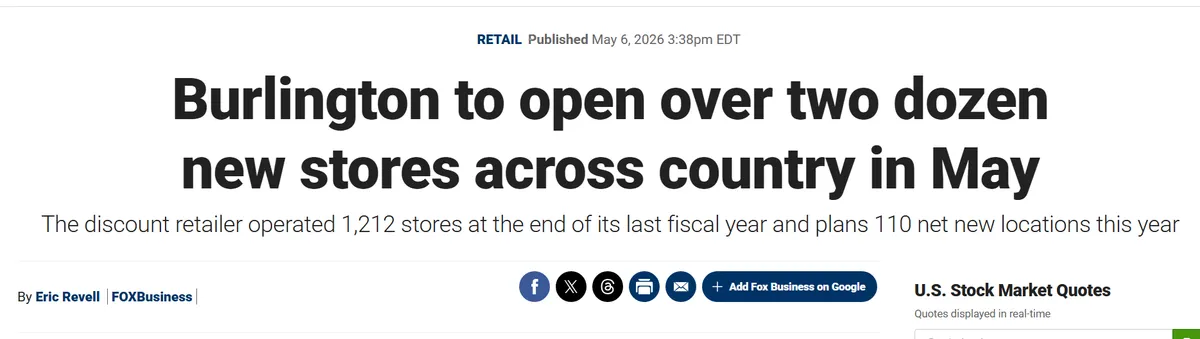
Source: Fox Business
However, this problem is harder to spot in your own data, especially if the same headcount or location count appears across several years.
The company may genuinely have stayed the same size, but your data provider may also have used a newer figure for earlier years. A repeated number alone won't tell you which explanation is right.
To investigate, trace where those figures came from.
Veridion can help with this. Each attribute comes with the sources it was derived from, the date those sources were last harvested, and a confidence score. Veridion also refreshes attributes at different rates: core company profiles continuously and more volatile signals daily. So the date on a value tells you when it was observed and how stale it could be.
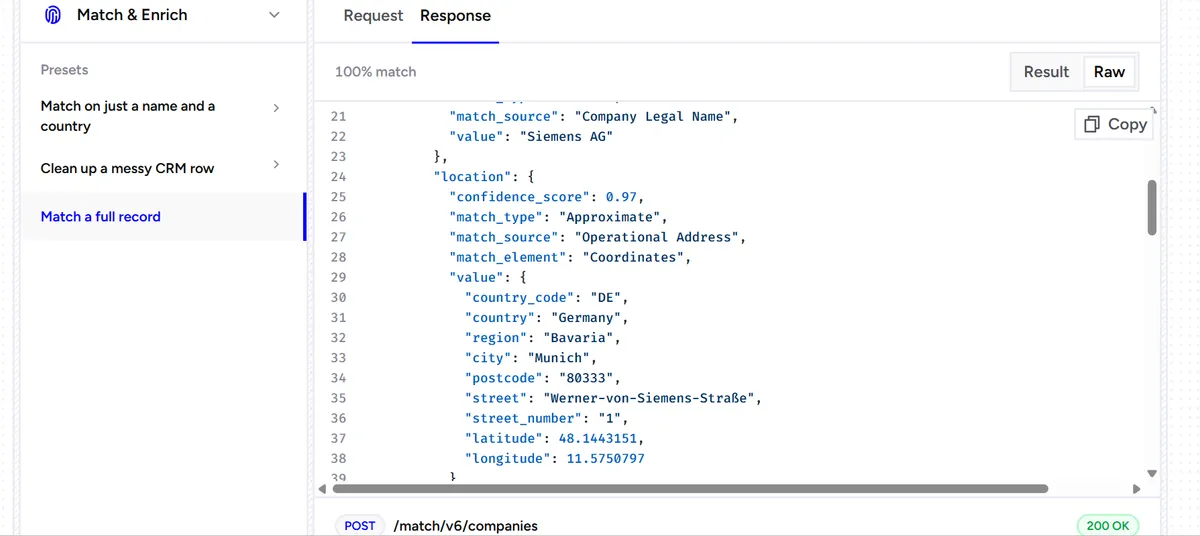
Source: Veridion
You can then compare the figures with company reports or other sources that give yearly counts to check whether they reflect the company's size during the period you're assessing.
But even when you get the total number of locations right, you still don't know whether the company operated the same locations.
Imagine a company closes one office and opens another. Its total number of locations stays the same, but it now operates in different places.
It could also leave one country and start operating in another without changing its total number of countries.
So, for a past credit application, you need to know how many people the company employed at the time and which offices and countries it operated in.
Applying a Later Industry Reclassification to Earlier Periods
If you use a company's new industry label in records from before the company was reclassified, your model could compare it with businesses from the wrong industry group.
Take AppLovin, an advertising technology company. On July 1, 2026, MSCI announced that AppLovin would move from Application Software to Advertising in its Global Standard Indexes. The change would take effect at the close of July 31, 2026.
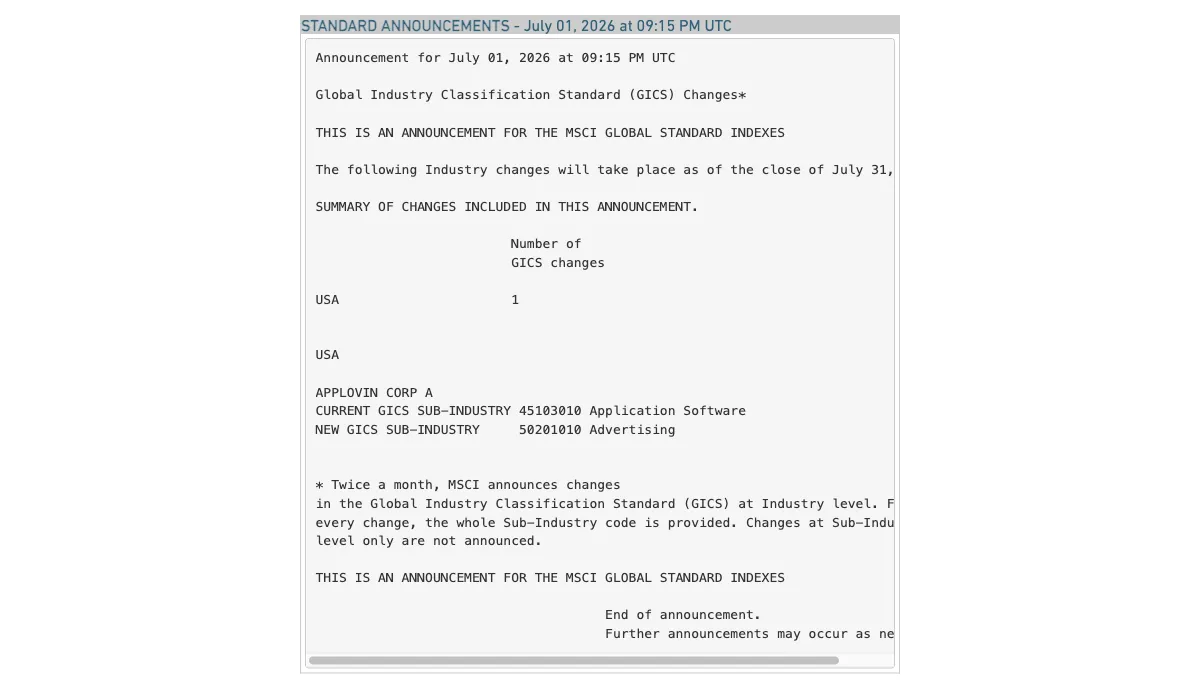
Source: MSCI
Now suppose a credit-data provider later replaced AppLovin's old industry label with the new one in its historical records.
A record from June 2026 would now show AppLovin as an advertising company, even though the change hadn't taken effect yet.
So if you use that record to test your model on a June application, the model could compare AppLovin's financial figures with those of advertising companies instead of software companies.
The financial figures may still be accurate for June. The problem is that the label puts AppLovin in the wrong peer group for that period.
An industry label doesn't tell you when it was applied, so this is easy to miss.
A company could show the same label across all its records because your provider replaced the old classification with the current one.
You can investigate this by looking at companies whose classifications changed on dates you can verify.
Back to AppLovin. If your data follows MSCI's classification, a June 2026 record should still show Application Software.
If it already shows Advertising, check whether your provider retains the earlier label or has replaced it in its historical records.
If it retains previous classifications and their effective dates, you can use them to reconstruct the industry groups that applied to past applications.
However, if it only keeps the latest label, you'll need a dated snapshot or another source showing which classification applied at the time.
Attaching a Parent Company That Didn't Exist Yet
Microsoft announced plans to acquire Activision Blizzard, a video game publisher, on January 18, 2022. The deal closed on October 13, 2023, when Microsoft became Activision Blizzard's parent.
Now imagine you're testing a credit model using a September 2023 record for Activision Blizzard, and your data provider already lists Microsoft as its parent.
Since Microsoft had announced the acquisition, you could take the pending deal into account when assessing Activision Blizzard at that time.
But the deal hadn't closed yet, so the record shouldn't list Microsoft as its existing parent.

Source: Microsoft
That matters if you use the parent field to add information about the wider corporate group to a borrower's record.
For example, you might include Microsoft's revenue, assets, or debt figures among the inputs used to assess Activision Blizzard.
You might also include a model feature that indicates whether the parent could help the subsidiary if it ran into financial trouble.
Fitch Ratings, a credit rating agency, covers this in its Parent and Subsidiary Linkage Rating Criteria.
It assesses how likely a parent is to support a struggling subsidiary by looking at the parent's financial strength, the subsidiary's own financial position, and how closely the two companies are connected.
To check whether your data carries current parent relationships back into older records, look at companies acquired during the period covered by your training or test data.
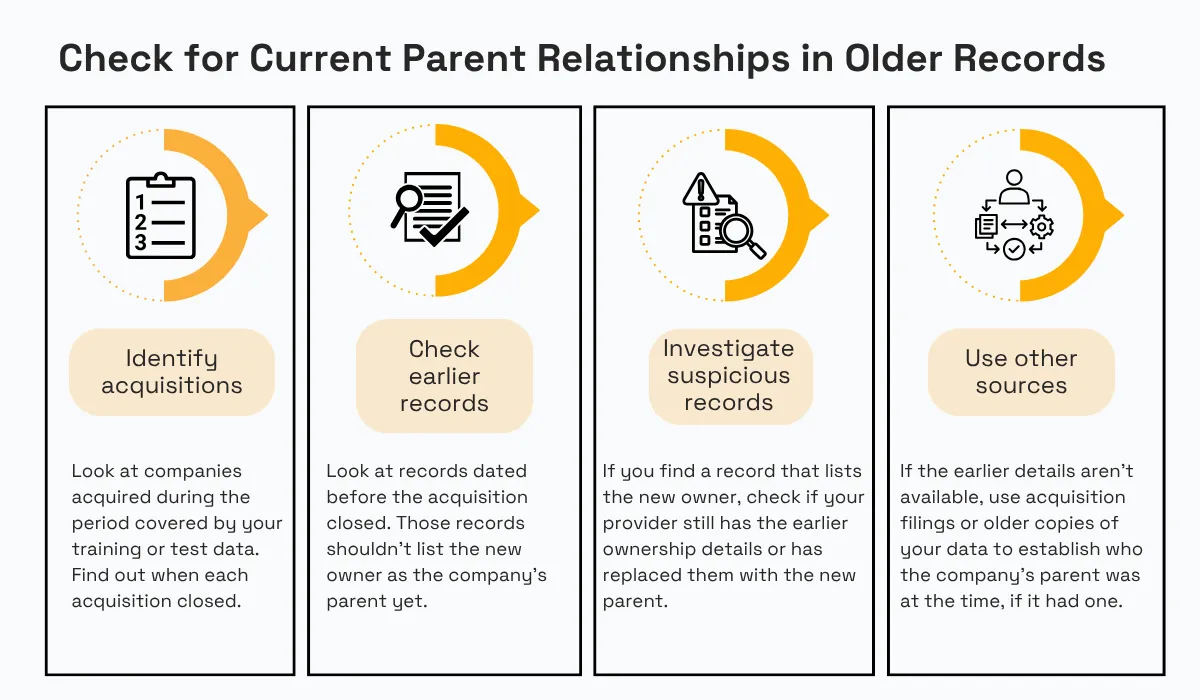
Source: Veridion
Find out when each acquisition closed, then check records dated before that date. Those records shouldn't list the new owner as the company's parent yet.
If you find one that does, check whether your provider still retains the earlier ownership details or has replaced them with the new parent.
You can then use those details, acquisition filings, or older copies of your data to establish who the company's parent was at the time, if it had one.
Ideally, each ownership link in your data should carry the date it took effect.
Getting the date right isn't enough, though.
You also need to confirm that the relationship is real and links the right companies.
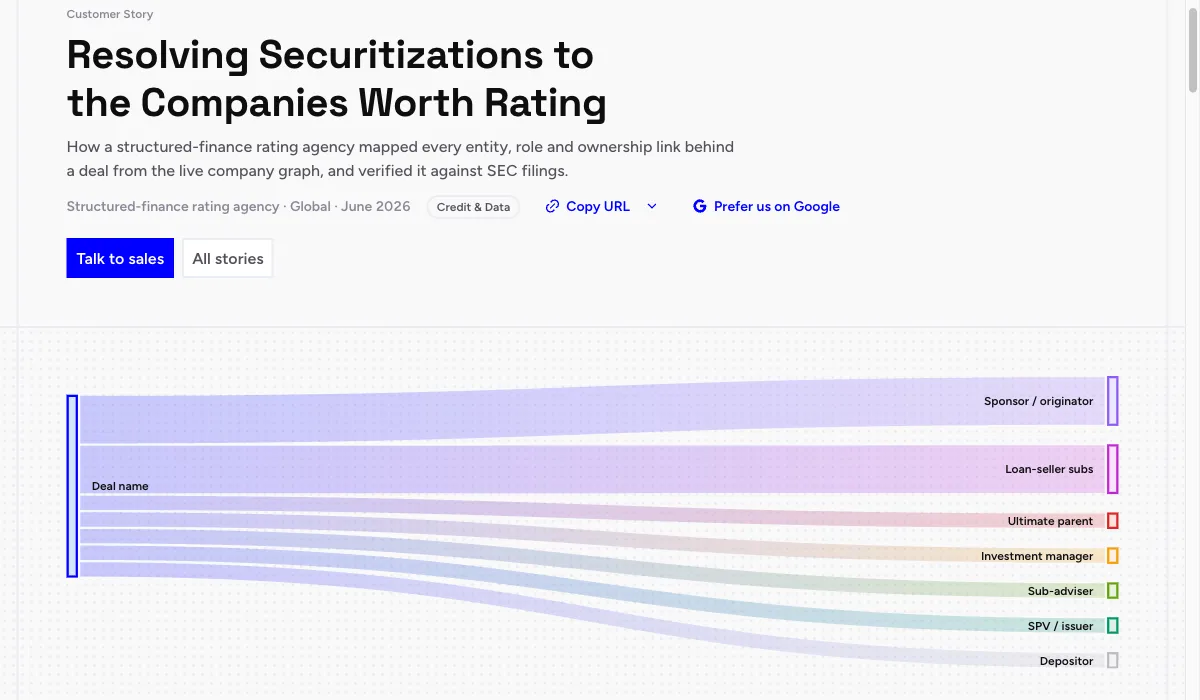
For example, a structured-finance rating agency used Veridion to map the companies behind securitization deals. Many names on its list were the deals themselves, such as securitization trusts and special-purpose vehicles, which standard company matching can't resolve.
Veridion resolved each deal to the operating companies behind it and classified each one by its role, such as parent, sponsor, originator, or depositor. Each match was checked against SEC filings and rating-agency reports and corrected where the documents showed it pointed to the wrong company.
Because every mapping came with a written justification, the agency's analysts could audit each relationship themselves. You can apply the same check to parent links in your own data by comparing each one with the filing that created it.
Source: Veridion
So when you use parent data to assess a company in the past, check that the record points to the right company and that the parent relationship existed when the credit application was made.
Using Post-Event Business Status as a Feature or Filter
Imagine you're testing a credit model using applications from 2022. One company was active when it applied but closed in 2024.
A provider that includes only companies still active today would leave out this company's 2022 record. The same would happen to other companies that applied in 2022 and later closed.
Your model would then estimate default risk based on companies that remained active, rather than the full set of companies that applied for credit at the time.
A 2019 study of 13,794 US public companies found that credit models that ignore survivorship make companies look safer than they are. During the early-1980s recession, for example, one-year default probabilities came out at 15% when survivorship was ignored and 25% once it was corrected. The study also found that ignoring survivorship could lead to firms being misclassified as solvent or insolvent.
However, a second problem can arise even when the company stays in your dataset. Your provider might keep its 2022 record but update its status to inactive after it closes in 2024.
If you then use that updated status as a feature for the company's 2022 application, the model can learn that the company later closed, even though that information wasn't available when the application was made.
Researchers face a similar timing problem when preparing data to predict defaults. In a 2026 study of 50,718 Italian SMEs, the authors used each company's data from one year to predict whether it would default in the next.
For companies that did default, they left out their records from the year they defaulted and the years that followed. That meant the model couldn't use information from after the default to predict it.
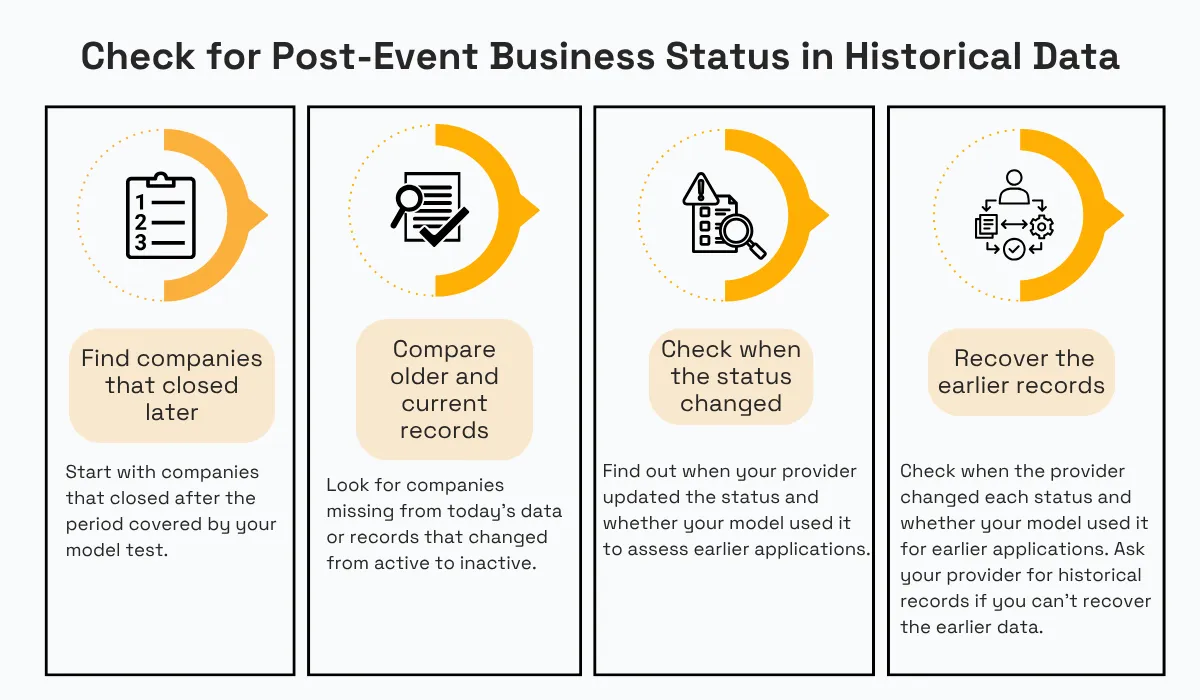
You can look for both problems in your own data by starting with companies that closed after the period you're testing.
Source: Veridion
Start with two quick checks. Does your training data include any inactive companies at all? And does any company have records dated after its dissolution or default? If there are no inactive companies, your provider has likely filtered them out.
Next, find a copy of the provider's company data that you saved around the time those companies applied for credit. Compare it with the company data you're using now.
You may find companies that appeared in the saved copy but are missing now. Others may still be listed, but their status may have changed from active to inactive.
For companies whose status changed, check when your provider updated it and whether your model used the new status to assess applications from before the company closed.
If you don't have a saved copy, ask your provider whether it retains historical records for companies that have since closed and whether it logs when their status changed.
Applying a Provider's Latest Corrected Value Across the Training Set
When you test an old credit application using your provider's current data, you may use a company figure that your provider changed after the application date.
The new figure may be more accurate, but you might not have had it in your data when you assessed the application.
For example, a company might report $80 million in revenue for 2022 in February 2023, then change that figure to $65 million in 2025.
If your provider updates its records, a record for a March 2023 application could now show $65 million, even though the company didn't report that amount until 2025.
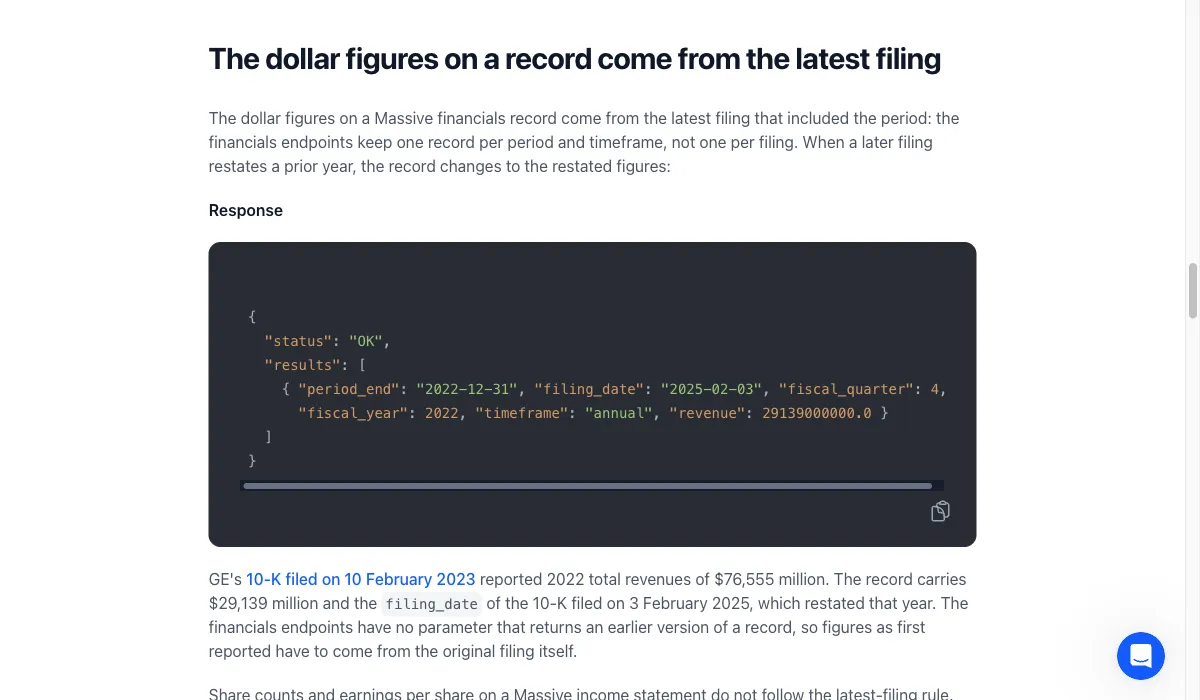
One way this happens is when your provider replaces an original figure with one from a newer SEC filing.
Massive, a financial market data provider, explains that it uses figures from the latest SEC filing. So when a company later files another report that changes those figures, Massive replaces the old figures in its records with the new ones.
Source: Massive
A correction like this can change the result you get when you test a model on past applications. The same issue affects financial research.
A working paper last revised in 2026 examined 35 accounting-based anomalies using Compustat data saved at different points in time. It found that the same company-period record was revised at least five times on average, and in roughly half the anomalies, the data version changed the researchers' conclusions and estimates of economic importance.
The study isn't about credit models, but it shows that the data version you use can change the result of a historical analysis.
You can look for this by comparing a company's revenue for the same year in your current data and in an older copy you saved.
If the figures differ, check when the company reported the newer amount. Veridion's guide to choosing a third-party risk data provider recommends checking where important data points came from and when they were last verified. Then compare the reporting date with the credit application date.
If the company reported the current figure after the application, use the most recent revenue figure it had reported by the application date and rerun your model test.
This lets you compare the results with your original test and see whether using the newer figure changed the model's predictions.
However, you can only make this correction if you can recover the earlier figure.
So ask your provider whether it keeps previous versions of its data and records when figures change. If it can't retrieve an earlier figure, keep a dated copy of its data each time you receive it.
You can then use those copies when testing past applications in the future, rather than relying only on your provider's latest figures.
Conclusion
All five cases share the same risk. Company data that is current or was corrected later can end up attached to a date in the past.
When that happens, your model may use information that wasn't available when the credit application was assessed, which can distort your backtest.
To check for this in your own data, start with one historical training set. Compare the headcount, locations, industry classification, parent relationship, business status, and financial figures across periods.
For each field, ask, “Is this value the same across all periods?” Then note which fields lack a date showing when the value became known.
Articles
Discuss how these trends affect your organization.
Our analysts are available for a short call. Bring a specific question and we will ground it in the data.
Insights
Keep reading
More analysis, research, and outcomes grounded in live company intelligence.
How to Choose a Third-Party Risk Data Provider (Without Getting Burned)
Tired of unexpected vendor issues? Learn how to identify emerging market risks and choose a third-party risk data provider that keeps you safe.
Point-in-Time Company Data: Why Historical Backtests Need Historical Truth
Looking into point-in-time company data? This guide will explain why accurate historical snapshots are critical for reliable model backtesting.
How to Build a Credit Risk Watchlist with Company-Level Data
Credit flags made up 99% of watchlist balances in Freddie Mac data for August 2026. Plan your credit risk watchlist around six rules.